Sierpinski Triangle Editor
forked from Sierpinski Triangle (diff: 271)
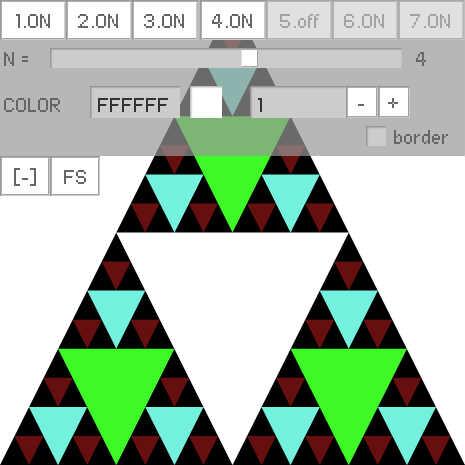

ActionScript3 source code
/**
 * Copyright WLAD ( http://wonderfl.net/user/WLAD )
 * MIT License ( http://www.opensource.org/licenses/mit-license.php )
 * Downloaded from: http://wonderfl.net/c/YdZP
 */

// forked from WLAD's Sierpinski Triangle
package {
    import flash.display.Sprite;
    /// @_wad1m , blog.wad1m.com
    public class SierpinskiTriangleMain extends Sprite {

        public function SierpinskiTriangleMain() {
            if( stage ) eInit(); else addEventListener(
            'addedToStage', eInit ); } private function
            eInit( e:* = null ):void {
            stage.align = 'tl';
            stage.color = 0xFFFFFF; // does not work...
            stage.quality = 'hight';
            stage.scaleMode='noScale';
            stage.frameRate = 10;
            stage.addEventListener('resize', resize );

            sierpinskiTriangle = new SierpinskiTriangle( stage.stageHeight );
            addChild( sierpinskiTriangle );

            var ui:UI = new UI( sierpinskiTriangle, this, 465 );

            resize();
        }

        private var sierpinskiTriangle:SierpinskiTriangle;

        private function resize( e:* = null ):void
        {


            var W:int = stage.stageWidth;
            var H:int = stage.stageHeight;

            // fill background

            graphics.clear();
            graphics.beginFill(stage.color);
            graphics.drawRect(0,0,W,H);
            graphics.endFill();


            sierpinskiTriangle.W = H;

            sierpinskiTriangle.refresh();

	    sierpinskiTriangle.y = H - sierpinskiTriangle.height;
	    sierpinskiTriangle.x = ( W - sierpinskiTriangle.width) / 2;;
        }
    }
}

import flash.display.Sprite;
import flash.display.Graphics;
import flash.geom.Point;
import flash.geom.Rectangle;

class SierpinskiTriangle extends Sprite {

	// logic : split one big triangle into 3 smaller one
	// code  : take the rectangle area that bounds the
	// triangle ( such as RECT=[x,y,w,w] ) and split
	// it into 3 smaller half size rectangles that bounds
	// the smaller triangles.

	private function
	split ( x:Number, y:Number, w:Number ):Array
	{
		// PICTURE:
		// http://math.bu.edu/DYSYS/chaos-game/sierp-det.GIF

		// consider step 2 for example

		// I then attempted to split the triangles
		// using rectangles top left edge coordinates.
		// the rectangle width will always be equal to
		// it's height. And could be calculated at any
		// step such as
		//     R.width[ N ] = globalWidth / ( N ^ 2 )
		// hence the return array is filled with
		// the 3 rectangles location coordinates

		return [

		// rectangle directly above the white triangle

		  new Point( x + w / 4, y ),

		// rectangle half way to the left of the white triangle

		  new Point( x, y + w / 2 ),

		// rectangle half way to the right of the white triangle

		  new Point( x + w / 2, y + w / 2 )

		];
	}

	// draw triangle to graphics given the bound rect

	private function
	draw ( x:Number, y:Number, w:Number, c:uint, border:Boolean ):void
	{
		// from the example picture, step 1 would
		// be impossible to render.
		// only at step 2 we see a white triangle appearing
		// hence I would draw the white triangle with the
		// relation to the black triangle bounding rectangle
		// as such

                graphics.lineStyle();
		graphics.beginFill( c );
		graphics.moveTo( x + w / 4, y + w / 2 );
		graphics.lineTo( x + 3 * w / 4, y + w / 2 );
		graphics.lineTo( x + w / 2, y + w );
		graphics.lineTo( x + w / 4, y + w / 2 );
		graphics.endFill();

                if( border )
                {
                    graphics.lineStyle(.1,0xFF0000);
                    graphics.drawRect( x, y, w, w );

		}
		// Count drawn triangles on screen

		count ++;
	}

	// perform a fractal step into the points array

	private function
	fractal ( data:Array, N:int = 1, depth:int = 1 ):void
	{
                var drawBorder:Boolean = drawBorderAt == depth;

		var i:int = 0;

		// when the first element in array is a point
		// stop stepping inside the points fractal
		// and advance additional step then write
		// changes into points array

		if( data[ 0 ] is Point )
		{
			for( i = 0; i < data.length; ++i )
			{
				// Read point from array

				var p:Point = data[ i ] as Point;

				// calc triangle size

				var w:Number = W / Math.pow( 2, depth );

				// Extract color

				var color:uint = 0xFFFFFF;

				if ( depth > colors.length ) colors.push( color );
				else color = colors[ depth ];

				var doSkip:Boolean = false;

				if ( depth > skip.length ) skip.push( doSkip );
				else doSkip = skip[ depth ];

				if ( ! doSkip )
				{
					// Draw point

					draw( p.x, p.y, w, color, drawBorder );
				}

				// Swap point with Points Array

				data[ i ] = split( p.x, p.y, w );
			}

			if( N <= 0 ) return;
		}

		// else step dipper into the fractal to
		// locate the bottom most array of points
		// in the fractal

		for( i = 0; i < data.length; ++i )
		{
			// step into the fractal

			fractal( data[ i ], N - 1, depth + 1 );
		}
	}

        public var W:Number = 0;
	public var drawBorderAt:int = -1;
	public var count:int = 0;
	public var skip:Array = [ false, false, true, true, false, false, false ];
	public var colors:Array = [ 0xFFFFFF, 0x3DFA27, 0x74F1DE, 0x660F0F, 0xF909FF, 0x20FFA6, 0xFFFF00 ];

	private var points:Array;

	private function reset():void
	{
                history = 0;
		count = 0;
		points = split( 0, 0, W );
		graphics.clear();
	}

        private var history:int = 0;

        public function refresh():void
        {
            render( history );
        }
	public function render( depth:int ):void
	{
		reset();

                history = depth;

		// draw initial triangle

		graphics.beginFill(0);
		graphics.moveTo( W/2, 0 );
		graphics.lineTo( W, W );
		graphics.lineTo( 0, W );
		graphics.lineTo( W/2, 0 );
		graphics.endFill();

		if ( depth > 0 )
		{
			if ( !skip[ 0 ] ) draw( 0, 0, W, colors[ 0 ] , drawBorderAt == 0 );

			if( depth < 8 && depth > 1 ) // from 1 to 7 including

				fractal( points, depth - 2 );

		}
	}

	public function SierpinskiTriangle( W:Number )
	{
		this.W = W;
	}
}

import com.bit101.components.*;

class UI
{
	private var target:SierpinskiTriangle;

	public function UI( target:SierpinskiTriangle, parent:Sprite, size:int ):void
	{
		var container:Sprite = new Sprite();
		container.scaleX = container.scaleY = 2;
		parent.addChild( container );
		this.target = target;

		var i:int = 0;
		var depth:int = 4;
		var btn:PushButton;
		var W:Number = size / 2;
		var posY:int = 0;

		// SKIP BUTTONS

		var buttons:Array = [];

		for ( i = 0; i < 7; i++ )
		{
			var btnBool:Boolean = target.skip[ i - 1 ];
			btn = new PushButton( container, i * (W / 7), posY,
			(i + 1) + "." + ( !btnBool ? "ON" : "off" ),
			function( e:*):void {

				var b:PushButton = e.target as PushButton;
				var index:int = parseInt( b.label.substring( 0, b.label.indexOf('.') ) );
				var bool:Boolean = target.skip[ index - 1 ];
				target.skip[ index - 1 ] = !bool;
				b.label = index + "." + ( bool ? "ON" : "off" );

				target.render( depth );
			});
			btn.enabled = i < depth;
			btn.width = W / 7;
			buttons.push( btn );
		}

		posY += btn.height ;

		var slider:HUISlider = new HUISlider( container, 0, posY, "N = ",
		function( e:* ):void {

			depth = slider.value;
			for ( i = 0; i < 7; i++ )
				buttons[ i ].enabled = !(i + 1 > depth);

			target.render( depth );

		});
		slider.width = W * 1.1;

		slider.labelPrecision = 0;
		slider.value = depth;
		slider.tick = 1;
		slider.minimum = 0;
		slider.maximum = 7;

		posY += slider.height + 5;

		// COLOR CONTROL


		new Label( container, 0, posY, "COLOR" );

		var colorChooser:ColorChooser = new ColorChooser( container, 45, posY,
		target.colors[0], function(e:*):void
		{
			target.colors[ stepper.value - 1 ] = colorChooser.value;

			target.render( depth );
		});

		colorChooser.usePopup = true;

		var stepper:NumericStepper = new NumericStepper( container,
		colorChooser.width + 60, posY, function( e:* ):void {

                        if( cb.selected )

                            target.drawBorderAt = stepper.value - 1;

                        else target.drawBorderAt = -1;

			colorChooser.value = target.colors[ stepper.value - 1 ];

			target.render( depth );
		});

		stepper.labelPrecision = 0;
		stepper.minimum = 1;
		stepper.maximum = 7;

                var hover:Sprite = new Sprite();
                parent.addChild( hover );
                hover.scaleX = hover.scaleY = 2;

		var toogleBtn:PushButton = new PushButton( hover, 0, 0, "[+]",
		function( e:* ):void {

			if ( hover.y == 0 )
			{
                                hover.y = posY * 2;
				container.visible = true;
				toogleBtn.label = "[-]";
			}
			else
			{
				hover.y = 0;
				container.visible = false;
				toogleBtn.label = "[+]";
			}

		});

		toogleBtn.width = 25;
	        var fsBtn:PushButton = new PushButton( hover, 25,0,"FS", function( e:* ):void {
                   if( parent.stage.displayState == 'normal' )
                       parent.stage.displayState = 'fullScreen';
                  else parent.stage.displayState = 'normal';
                });

                fsBtn.width = 25;

    		posY += colorChooser.height + 5;

                var cb:CheckBox = new CheckBox( container, W - 50, posY, "border", function( e:* ):void {

                        if( cb.selected )

                            target.drawBorderAt = stepper.value - 1;

                        else target.drawBorderAt = -1;

			target.render( depth );
                });

                posY += cb.height + 5;

                container.graphics.beginFill( 0x999999, 0.7 );
                container.graphics.drawRect( 0, 0, W, posY );
                container.graphics.endFill();

		container.visible = false;

		target.render( depth );

	}
}