Sierpinski Triangle
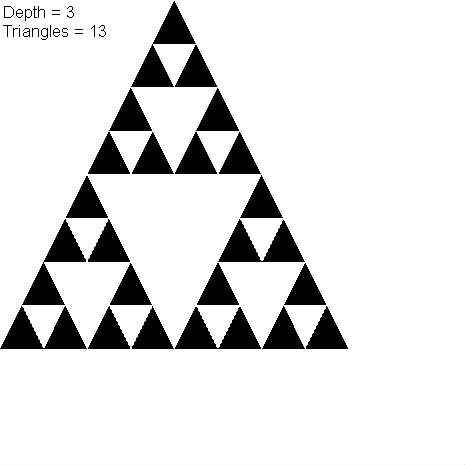
My attempt to solve the Sierpinski Triangle render problem.

^ Use mouse click to interact ^
♥0 |
Line 99 |
Modified 2016-03-18 03:15:30 |
MIT License
archived:2017-03-20 02:37:22
ActionScript3 source code
/**
 * Copyright WLAD ( http://wonderfl.net/user/WLAD )
 * MIT License ( http://www.opensource.org/licenses/mit-license.php )
 * Downloaded from: http://wonderfl.net/c/IVnS
 */

package {
    import flash.display.*;
    import flash.geom.*;
    import flash.text.*;
    /// @_wad1m , blog.wad1m.com
    public class SierpinskiTriangle extends Sprite {

        // logic : split one big triangle into 3 smaller one
        // code  : take the rectangle area that bounds the
        // triangle ( such as RECT=[x,y,w,w] ) and split
        // it into 3 smaller half size rectangles that bounds
        // the smaller triangles.

        private function
        split ( x:Number, y:Number, w:Number ):Array
        {
            // PICTURE:
            // http://math.bu.edu/DYSYS/chaos-game/sierp-det.GIF

            // consider step 2 for example

            // I then attempted to split the triangles
            // using rectangles top left edge coordinates.
            // the rectangle width will always be equal to
            // it's height. And could be calculated at any
            // step such as
            //     R.width[ N ] = globalWidth / ( N ^ 2 )
            // hence the return array is filled with
            // the 3 rectangles location coordinates

            return [

            // rectangle directly above the white triangle

              new Point( x + w / 4, y ),

            // rectangle half way to the left of the white triangle

              new Point( x, y + w / 2 ),

            // rectangle half way to the right of the white triangle

              new Point( x + w / 2, y + w / 2 )

            ];
        }

        // draw triangle to graphics given the bound rect

        private function
        draw ( g:Graphics, x:Number, y:Number, w:Number ):void
        {
            // from the example picture, step 1 would
            // be impossible to render.
            // only at step 2 we see a white triangle appearing
            // hence I would draw the white triangle with the
            // relation to the black triangle bounding rectangle
            // as such

            g.beginFill( 0xFFFFFF );
            g.moveTo( x + w / 4, y + w / 2 );
            g.lineTo( x + 3 * w / 4, y + w / 2 );
            g.lineTo( x + w / 2, y + w );
            g.lineTo( x + w / 4, y + w / 2 );
            g.endFill();

            // Count drawn triangles on screen

            count ++;
        }

        // perform a fractal step into the points array

        private function
        fractal ( data:Array, g:Graphics, depth:int = 1 ):void
        {
            var i:int = 0;

            // when the first element in array is a point
            // stop stepping inside the points fractal
            // and advance additional step then write
            // changes into points array

            if( data[ 0 ] is Point )
            {
                for( i = 0; i < data.length; ++i )
                {
                    // Read point from array

                    var p:Point = data[ i ] as Point;

                    // calc triangle size

                    var w:Number = W / Math.pow( 2, depth );

                    // Draw point

                    draw( g, p.x, p.y, w );

                    // Swap point with Points Array

                    data[ i ] = split( p.x, p.y, w );
                }

                return;
            }

            // else step dipper into the fractal to
            // locate the bottom most array of points
            // in the fractal

            for( i = 0; i < data.length; ++i )
            {
                // step into the fractal

                fractal( data[ i ], g, depth + 1 );
            }
        }

        private var count:int = 0;

        private var W:int = 0;

        public function SierpinskiTriangle() {
            if( stage ) eInit(); else addEventListener(
            'addedToStage', eInit ); } private function
            eInit( e:* = null ):void {
            stage.align = 'tl';
            stage.color = 0xFFFFFF; // does not work...
            stage.quality = 'low';
            stage.scaleMode='noScale';
            stage.frameRate = 10;

            W = stage.stageWidth;

            // fill background

            graphics.beginFill(stage.color);
            graphics.drawRect(0,0,W,W);
            graphics.endFill();

            // output text

            var tf:TextField=new TextField();
            addChild(tf);tf.textColor=0x000000;
            tf.scaleX = tf.scaleY = 1.4;
            tf.autoSize='left';tf.mouseEnabled = false;

            // draw initial black triangle

            graphics.beginFill(0);
            graphics.moveTo( W/2, 0 );
            graphics.lineTo( W, W );
            graphics.lineTo( 0, W );
            graphics.lineTo( W/2, 0 );
            graphics.endFill();


            // init drawing target

            var S:Shape = addChild( new Shape() ) as Shape;

            // no step - zero

            var N:int = 0;

            // zero points array fractal

            var points:Array = split( 0, 0, W );

            // each second > advance deeper into the fractal

            var advanceTimer:int = 0;
            var advanceTimeout:int = 10;
            addEventListener('enterFrame',
            function(e:*):void {
            if( ++advanceTimer > advanceTimeout )
            {
                advanceTimer = 0;

                N++;

                // If first step, draw single

                if( N == 1 ) draw( S.graphics, 0, 0, W );

                // Else use fractals

                else if( N < 8 ) // from 1 to 7 including

                    fractal( points, S.graphics );

                // If too deep > reset

                else
                {
                    // reset

                    N = 0;
                    count = 0;
                    points = split( 0, 0, W );

                    S.graphics.clear();
                }

                // print data

                tf.text = "Depth = " + N + "\nTriangles = " + count;

            }});

            // clear rendered triangles on click

            stage.addEventListener('mouseDown',
            function( e:* ):void
            {S.graphics.clear();});
        }
    }
}