/**
 * Copyright actionscriptbible ( http://wonderfl.net/user/actionscriptbible )
 * MIT License ( http://www.opensource.org/licenses/mit-license.php )
 * Downloaded from: http://wonderfl.net/c/wo3W
 */

package {
  import com.actionscriptbible.Example;

  import flash.display.Sprite;
  import flash.events.MouseEvent;
  import flash.text.TextField;

  public class ch21ex9 extends Example {
    protected var screen:Sprite;
    public function ch21ex9() {
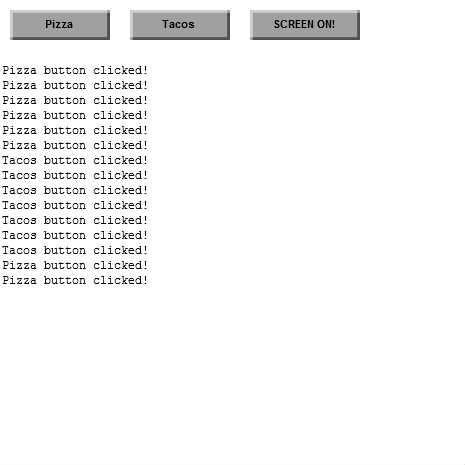
      makeTestButton();
    }
    protected function makeTestButton():void {
      var button:TestButton;
      button = new TestButton(100, 30, "Pizza");
      addChild(button); button.x = 10; button.y = 10;
      button.addEventListener(MouseEvent.CLICK, onPizzaClick);

      button = new TestButton(100, 30, "Tacos");
      addChild(button); button.x = 130; button.y = 10;
      button.addEventListener(MouseEvent.CLICK, onTacosClick);

      button = new TestButton(110, 30, "SCREEN ON!");
      addChild(button); button.x = 250; button.y = 10;
      button.addEventListener(MouseEvent.CLICK, onScreenClick);

      trace("\n\n\n");
    }
    protected function onPizzaClick(event:MouseEvent):void {
      trace("Pizza button clicked!");
    }
    protected function onTacosClick(event:MouseEvent):void {
      trace("Tacos button clicked!");
    }
    protected function onScreenClick(event:MouseEvent):void {
      trace("---- blocking events ----");
      screen = new Sprite();
      screen.graphics.beginFill(0, 0); //optionally, dim screen
      screen.graphics.drawRect(0, 0, stage.stageWidth, stage.stageHeight);
      //TODO: in a real application, add stage resize listeners
      screen.graphics.endFill();
      screen.mouseEnabled = true;
      addChild(screen); //TODO: ensure that screen stays on top
      //TODO: optionally, handle all events and cancel them
    }
  }
}
import flash.display.*;
import flash.text.*;
import flash.events.MouseEvent;
import flash.filters.BevelFilter;

class TestButton extends Sprite {
  protected var bg:Shape;
  protected var label:TextField;
  public function TestButton(w:Number, h:Number, labelText:String) {
    bg = new Shape();
    addChild(bg);
    bg.graphics.beginFill(0xa0a0a0);
    bg.graphics.drawRect(0, 0, w, h);
    label = new TextField();
    addChild(label);
    label.defaultTextFormat = new TextFormat("_sans", 11, 0, true, false,
      false, null, null, "center");
    label.width = w;
    label.height = h;
    label.text = labelText;
    label.y = (h - label.textHeight)/2 - 2;
    buttonMode = true;
    mouseChildren = false;
    addEventListener(MouseEvent.MOUSE_DOWN, onMouseDown);
    addEventListener(MouseEvent.MOUSE_UP, onMouseUp);
    onMouseUp(null);
  }
  protected function onMouseDown(event:MouseEvent):void {
    bg.filters = [new BevelFilter(4, 225, 0xffffff, 0.5, 0, 0.5, 1, 1, 1, 3)];
    label.x++; label.y++;
  }
  protected function onMouseUp(event:MouseEvent):void {
    bg.filters = [new BevelFilter(-4, 225, 0xffffff, 0.5, 0, 0.5, 1, 1, 1, 3)];
    label.x--; label.y--;
  }
}