試作品:アナログ時計2
forked from 試作品:アナログ時計 (diff: 162)
基本的に1と同じ
書き方が違うだけ
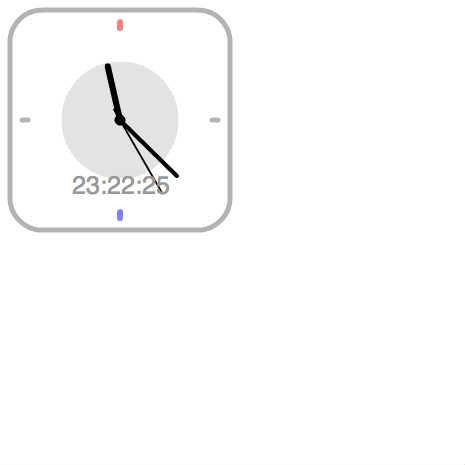

ActionScript3 source code
/**
 * Copyright Nowloading_ ( http://wonderfl.net/user/Nowloading_ )
 * MIT License ( http://www.opensource.org/licenses/mit-license.php )
 * Downloaded from: http://wonderfl.net/c/uxQM
 */

package {
    import flash.display.Sprite;
    import flash.text.TextField;
    import flash.text.TextFormat;
    import flash.text.TextFormatAlign;
    import flash.events.TimerEvent;
    import flash.utils.Timer;

    [SWF (width=465,height=465,frameRate=30,backgroundColor=0xffffff)]

    public class FlashTest extends Sprite {
        private const cx:int = 120;
        private const cy:int = 120;
        private var data:Date; //日時データ
        private var h:Number; //時間
        private var m:Number; //分
        private var s:Number; //秒
        private var ttex:TextField;
        private var ttf:TextFormat;
        private var tim:Timer; //1秒タイマー
        private var lsin:Sprite; //長針
        private var ssin:Sprite; //短針
        private var bsin:Sprite; //秒針
        private var tball:Sprite;
        private var _bd:BodyDraw;
        //メインファンクション
        public function FlashTest() {
            //text = new TextField();
            _bd = new BodyDraw();
            stage.addChild(_bd);
            _shari();
            _stim();
            _ttf();
            ttex = new TextField();
            ttex.width=200;
            bsin.addChild(ttex);
        }
        //針の描画設定(lsin:長針ssin:短針bsin:秒針)
        private function _shari():void{
            //長針の設定
            lsin = new Sprite();
            stage.addChild(lsin);
            lsin.x = cx;
            lsin.y = cy;
            //短針の設定
            ssin = new Sprite();
            lsin.addChild(ssin);
            //秒針の設定
            bsin = new Sprite();
            ssin.addChild(bsin);
        }
        //タイマー(1000ms)の設定と開始
        private function _stim():void{
            tim = new Timer(1000);
            tim.reset();
            tim.addEventListener(TimerEvent.TIMER,clock);
            tim.start();
        }
        private function _ttf():void{
            ttf = new TextFormat();
            ttf.size = 25;
            ttf.font="_sans";
            ttf.color= 0x999999;
            //ttf.align=TextFormatAlign.CENTER;
        }
        //1秒毎の処理
        public function clock(e:TimerEvent):void{
            _ctex();
            _chari();
            _bd.BallMove();
            ttex.x=-50;
            ttex.y=50;
            ttex.defaultTextFormat=ttf;
            var ss:String="0";
            if (s < 10){
                ss = "0"+String(s);
            }else {
                ss = String(s);
            }
            var mm:String="0";
            if (m < 10){
                mm = "0"+String(m);
            }else {
                mm = String(m);
            }
            var hh:String="0";
            if (h < 10){
                hh = "0"+String(h);
            }else {
                hh = String(h);
            }
            ttex.text = hh+":"+mm+":"+ss;
        }

        public function _ctex():void{
            data = new Date();
            h = data.getHours();
            m = data.getMinutes();
            s = data.getSeconds();
        }
        private function _chari():void{
            bsin.graphics.clear();
            bsin.graphics.moveTo(0,0);
            bsin.graphics.lineStyle(2,0x000000);
            bsin.graphics.lineTo(85*Math.sin(6*s*Math.PI/180),
            -85*Math.cos(6*s*Math.PI/180));
            bsin.graphics.lineTo(-12*Math.sin(6*s*Math.PI/180),
            12*Math.cos(6*s*Math.PI/180));

            ssin.graphics.clear();
            ssin.graphics.moveTo(0,0);
            ssin.graphics.lineStyle(4,0x000000);
            ssin.graphics.lineTo(80*Math.sin(((6*m)+(s/10))*Math.PI/180),
            -80*Math.cos(((6*m)+(s/10))*Math.PI/180));

            lsin.graphics.clear();
            lsin.graphics.moveTo(0,0);
            lsin.graphics.lineStyle(6,0x000000);
            lsin.graphics.lineTo(55*Math.sin(((15*h)+(m/10))*Math.PI/180),
            -55*Math.cos(((15*h)+(m/10))*Math.PI/180));
        }

    }
}

import flash.display.Sprite;
import caurina.transitions.Tweener;
class BodyDraw extends Sprite{
    private const cx:int = 120;
    private const cy:int = 120;
    private var lsin:Sprite; //長針
    private var ssin:Sprite; //短針
    private var bsin:Sprite; //秒針
    private var _body:Sprite;
    private var _ball:Sprite;

    public function BodyDraw(){
        SetFlame();
        SetBall();
    }
    public function SetFlame():void{
        _body = new Sprite();
        _body.x=cx;
        _body.y=cy;
        addChild(_body);
        _body.graphics.beginFill(0x000000);
        _body.graphics.lineStyle(1,0x000000);
        _body.graphics.drawCircle(0,0,5);
        _body.graphics.endFill();
        _body.graphics.lineStyle(6,0xff0000,0.5);
        _body.graphics.moveTo(0,-92);
        _body.graphics.lineTo(0,-98);
        _body.graphics.lineStyle(6,0x0000ff,0.5);
        _body.graphics.moveTo(0,92);
        _body.graphics.lineTo(0,98);
        _body.graphics.lineStyle(5,0x000000,0.3);
        _body.graphics.moveTo(-92,0);
        _body.graphics.lineTo(-98,0);
        _body.graphics.moveTo(92,0);
        _body.graphics.lineTo(98,0);
        _body.graphics.drawRoundRect(-110,-110,220,220,65,65);
    }
    public function SetBall():void{
        _ball = new Sprite();
        _ball.x=cx;
        _ball.y=cy;
        addChild(_ball);
        _ball.graphics.beginFill(0x000000,0.11);
        _ball.graphics.lineStyle(0,0x000000,0);
        _ball.graphics.drawCircle(0,0,70);
        _ball.graphics.endFill();
    }
    public function BallMove():void{
        Tweener.addTween(_ball, {
            scaleX: 0.73,
            scaleY: 0.73,
            time: 0.23,
            transition: "easeoutclick",
            onComplete: next,
            onCompleteParams: [_ball]
        });
    }
    private function next(tball:Sprite):void{
        Tweener.addTween(_ball, {
            scaleX: 1.0,
            scaleY: 1.0,
            time: 0.34,
            transition: "easeoutback"
        });
    }
}