FF: Autofiting a textfield to height and TextLineMetrics visualized
forked from Autofiting a textfield to height and TextLineMetrics visualized (diff: 126)
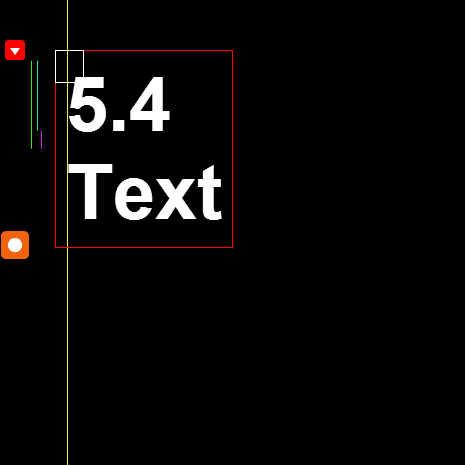

ActionScript3 source code
/**
 * Copyright WLAD ( http://wonderfl.net/user/WLAD )
 * MIT License ( http://www.opensource.org/licenses/mit-license.php )
 * Downloaded from: http://wonderfl.net/c/qh2R
 */

/**
Before reading the code, check out the illustration here:
http://help.adobe.com/en_US/FlashPlatform/reference/actionscript/3/flash/text/TextLineMetrics.html

I'm using the textField's scale propriety since #METHOD_2
( commented ) will become too slow on big scales and
eventually result in a crash.

**********
CONTROLS
**********
Drag the rectangular orange boxes to resize the text field
Right click menu was intentialy left enabled to play around
with the stage zoom values

***********************************************
LINES COLORS VALUES ( VISUAL REPRESENTATION )
***********************************************

( TextLineMetrics Properties )

GREEN					: TextLineMetrics.height
SKY BLUE				: TextLineMetrics.ascent
PURPLE				: TextLineMetrics.descent
BLUE					: TextLineMetrics.leading
	( for some reason the value is zero and the
		line doesn't get rendered )
YELLOW				: TextLineMetrics.x
	( don't ask - i don't know why it's not working )

( TextField Properties )

RED		Rectangle : TextField.getBounds( TextField.parent );
WHITE		Rectangle : TextField.textWidth & TextField.textHeight

*****
BUGS
*****

#Bug1
For multiline text notice when increasing the textField scale value.
The second line will disappear . A bug ?... My values were:
 ~3.8 , ~5.3 ...
also when zoomed in via the right click once, 1.9 was
causing this bug

#Bug2
Try to use the right click mouse controls - to zoom in
and play around with the size of the text
it won't get any bigger on the physical screen.

#Bug3
Notice on the big scales the white box becomes suddenly
smaller. So that means scalling the textField beyord 14 ( value
on my machine ) will effect the TextField.textWidth
& TextField.textHeight values
*/


// forked from WLAD's Autofiting a textfield to height and TextLineMetrics visualized
package {
    import flash.display.Graphics;
    import flash.display.Shape;
    import flash.display.Sprite;
    import flash.geom.Rectangle;
    import flash.text.TextField;
    import flash.text.TextFormat;
    import flash.text.TextLineMetrics;
    public class TextFieldTest extends Sprite {
        private var b1:Box; private var b2:Box;
        private var bg:Shape;private var g:Graphics;
        public function TextFieldTest()
        {
            SW = stage.stageWidth;SH = stage.stageHeight;
            // BG
            bg = new Shape();addChild( bg );bg.graphics.beginFill(0);bg.graphics.drawRect(0, 0, SW, SH);bg.graphics.endFill();
            // UI GRAPHICS
            var ui:Shape = new Shape();addChild( ui );g = ui.graphics;
            // TOP DRAG BOX
            b1 = new Box(0xF5AE0A,50,190, onResize);addChild(b1);b1.x = 15;b1.y = 190;
            // BOTTOM DRAG BOX
            b2 = new Box(0xF1630E,205, SH - 25, onResize);addChild(b2);b2.x = 15;b2.y = 245;


            text = new TextField();
            addChild( text );
            text.text = "TextField\n14";
            text.autoSize = "left";
            text.wordWrap = false;
            text.multiline = true;
            text.selectable = false;

            tf = new TextFormat("Helvetica", 14, 0xFFFFFF, true);
            text.defaultTextFormat = tf;
            text.setTextFormat( tf );

            textHeight = text.getBounds(this).height;

            onResize();
        }

        private var text:TextField;

        private var tf:TextFormat;

        private var textHeight:Number;

        private function onResize():void
        {
            text.x = b1.x + 40;
            text.y = b1.y;

            var height:Number = b2.y - b1.y;

            text.scaleX = text.scaleY = height / textHeight;

            text.text = text.scaleY.toFixed(1) + "\nText";

            /*
            // ###########
            // #METHOD_2    (START)
            // ###########


            //while ( text.textHeight < height )
            while ( text.getBounds(this).height < height )
            {
                //tf.size = Number(tf.size) + 1;

                //text.defaultTextFormat = tf;
                //text.setTextFormat( tf );

                text.scaleY = text.scaleX = text.scaleY + 0.1;
            }

            //while ( text.textHeight > height )
            while ( text.getBounds(this).height > height )
            {

                //tf.size = Number(tf.size) - 1.6;

                //text.defaultTextFormat = tf;
                //text.setTextFormat( tf );

                text.scaleY = text.scaleX = text.scaleY - 0.1;
            }
            */

            //text.text = String(tf.size) + " Text";

            //text.text = text.height.toFixed() + ' , ' + text.textHeight.toFixed() + " , " + height.toFixed();


            // ###########
            // #METHOD_2   (END)
            // ###########

            var tm:TextLineMetrics = text.getLineMetrics(0);
            var s:Number = text.scaleX;

            // http://help.adobe.com/en_US/FlashPlatform/reference/actionscript/3/flash/text/TextLineMetrics.html

            var p2xGutter:Number = +2 * s;

            g.clear();


            // LINE HEIGHT - GREEN

            g.lineStyle(1, 0x45E01F);
            g.moveTo(b1.x + 16, p2xGutter + b1.y);
            g.lineTo(b1.x + 16, p2xGutter + b1.y + s * tm.height);

            // ASCENT - SKY COLOR

            g.lineStyle(1, 0x18E7BD);
            g.moveTo(b1.x + 22, p2xGutter + b1.y);
            g.lineTo(b1.x + 22, p2xGutter + b1.y + s * tm.ascent);

            // DESCENT - PURPLE

            g.lineStyle(1, 0xD817E8);
            g.moveTo(b1.x + 26, p2xGutter + b1.y + s * tm.ascent);
            g.lineTo(b1.x + 26, p2xGutter + b1.y + s * tm.ascent + s * tm.descent);

            // LEADING - BLUE

            g.lineStyle(1, 0x156AEA);
            g.moveTo(b1.x + 30, p2xGutter + b1.y + s * tm.ascent + s * tm.descent);
            g.lineTo(b1.x + 30, p2xGutter + b1.y + s * tm.ascent + s * tm.descent + s * tm.leading);

            // TextLineMetrics.x value - YELLOW ( don't ask - i don't know why it's not working )

            g.lineStyle(1, 0xEEF248);
            g.moveTo(text.x + tm.x, 0);
            g.lineTo(text.x + tm.x, SH);

            // BOUNDS - RED

            var r:Rectangle = text.getBounds(this);
            g.lineStyle(1, 0xFF0000);
            g.drawRect(r.x, r.y, r.width, r.height);

            // textWidth and textHeight - White

            g.lineStyle(1, 0xFFFFFF);
            g.drawRect(text.x, text.y, text.textWidth, text.textHeight);
        }
    }
}

import flash.display.Sprite;

class Box extends Sprite {

    private var min:Number;
    private var max:Number;
    private var onDrag:Function = null;
    private var color:uint = 0x0;
    private var limitColor:uint = 0xFF0000;

/// 0 : no limit, -1 : up, +1, down
public function setLimit( limit:int ):void
{

        graphics.beginFill( limit == 0 ? color : limitColor );
        graphics.drawRoundRect(-10, -10, 20, 20, 7);
        graphics.endFill();
        graphics.beginFill(0xFFFFFF);

        if( limit < 0 )
        {
            graphics.moveTo( 0, -5 );
            graphics.lineTo( 5, 2 );
            graphics.lineTo( -5, 2 );
            graphics.lineTo( 0, -5 );
        }

        else if ( limit > 0 )
        {
            graphics.moveTo( 0, 5 );
            graphics.lineTo( 5, -2 );
            graphics.lineTo( -5, -2 );
            graphics.lineTo( 0, 5 );

        }
        else graphics.drawCircle(0, 0, 5);
        graphics.endFill();
}


    public function Box( color:uint = 0xFF8000, min:Number = NaN, max:Number = NaN, onDrag:Function = null )
    {
        this.color = color;
        this.min = min;
        this.max = max;
        this.onDrag = onDrag;

        scaleX = scaleY = 1.4;

        setLimit( 0 );

        useHandCursor = buttonMode = true;

        addEventListener("addedToStage", function(e:*= null):void
        {
            addEventListener("mouseDown",
                function(e:*= null):void {
                    addEventListener("enterFrame", drag);
            });

            stage.addEventListener("mouseUp",
                function(e:*= null):void {
                    removeEventListener("enterFrame", drag);
            });

        });
    }

    private function drag(e:*= null):void
    {
        scaleX = scaleY = 1.4; y = stage.mouseY;

        if ( !isNaN( min ) && y < min )
        {
            y = min;
            scaleX = scaleY = 1;
            setLimit( 1 );
        }
        else if ( !isNaN( max ) && y > max )
        {
            y = max;
            scaleX = scaleY = 1;
            setLimit( -1 );
        }
        else
        {
          setLimit( 0 );
        }

        if ( onDrag != null )
            onDrag();
    }

}

var SW:int = 465;
var SH:int = 465;