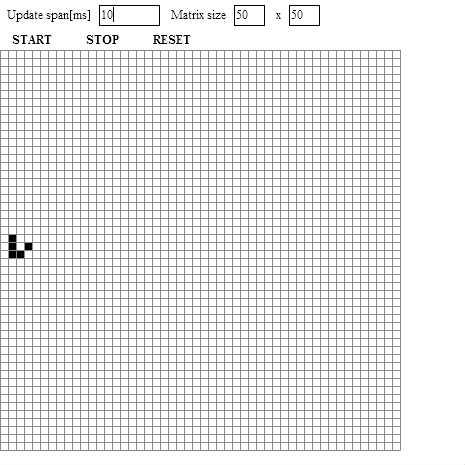
/**
 * Copyright aflc ( http://wonderfl.net/user/aflc )
 * MIT License ( http://www.opensource.org/licenses/mit-license.php )
 * Downloaded from: http://wonderfl.net/c/jIGY
 */

package
{
	import flash.display.*;
	import flash.ui.*;
	import flash.events.*;
	import flash.geom.*;
	import flash.text.*;
	import flash.utils.Timer;
	[SWF(backgroundColor = "0xffffff", width = "465", height = "465", framerate = "30")]

	/**
	 * @author aflc
	 */
	public class Main extends Sprite
	{
		/// 設定関係のリテラルはすべてここに集約する
		private static const TOOLBAR_SIZE:int = 50;
		private static const UPDATE_TIMING_DEFOULT:int = 100; // 更新時間間隔 [ms]

		private var _arr_size:Point = new Point(50, 50); // ブロックmatrixのサイズ
		private var _block_arr:Array; // ブロックの二次元配列。arrayで実装すると型指定が適当になるからやだね。arr[横:左0][縦:上0]
		private var _block_size:int;
		private var _box_size:Rectangle = new Rectangle(0, TOOLBAR_SIZE, stage.stageWidth, stage.stageHeight - TOOLBAR_SIZE);
		private var _timer:Timer;
		private var _btn_start:SimpleButton;
		private var _btn_stop:SimpleButton;
		private var _btn_reset:SimpleButton;
		private var _ti_mat_x:TextField;
		private var _ti_mat_y:TextField

		public function Main():void  {
			if (stage) init();
			else addEventListener(Event.ADDED_TO_STAGE, init);
		}
		private function init(e:Event = null):void {
			removeEventListener(Event.ADDED_TO_STAGE, init);
			// entry point お決まり
			stage.scaleMode = StageScaleMode.NO_SCALE;
			stage.align = StageAlign.TOP_LEFT;

			create_toolbar(); // ツールバーの作成
			create_block_arr(); // ライフたちが生まれる

			_timer = new Timer(UPDATE_TIMING_DEFOULT);
		}
		/** ライフの更新
		 *  今回のライフは無限のフィールドではなく、二次元トーラス上にいることを考える。
		 *  例えば (x,y) \in [0,1] の時 (x,y) = (x+(-)1.y+(-)1)である。
		 */
		private function evt_update_lives(evt:TimerEvent) : void {
			for each ( var col:Array in _block_arr ) {
				for each ( var block:Block in col ) {
					if ( block.is_alive ) block.send_i_am_alive();
				}
			}
			for each ( var cold:Array in _block_arr ) {
				for each ( var blockd:Block in cold ) {
					blockd.update();
				}
			}
		}
		/** ブロックを作る関数 */
		private function create_block_arr() : void {
			// 古いのを削除
			for each( var arr:Array in _block_arr ) {
				for each ( var b:Block in arr ) {
					remove_from_box(b);
				}
			}
			_block_arr = new Array(); // initialize(Array.clear())
			// ブロックの大きさを、指定されたmatrixの大きさから計算する。
			if (_box_size.width / _arr_size.x < _box_size.height / _arr_size.y) {
				_block_size = _box_size.width / _arr_size.x;
				if ( _block_size < 6 ) { // 6ピクセルが限界です
					_block_size = 6;
					_arr_size.x = Math.floor(_box_size.width / 6);
					_ti_mat_x.text = _arr_size.x.toString();
				}
			} else {
				_block_size = _box_size.height / _arr_size.y;
				if ( _block_size < 6 ) { // 6ピクセルが限界です
					_block_size = 6;
					_arr_size.y = Math.floor(_box_size.height / 6);
					_ti_mat_y.text = _arr_size.y.toString();
				}
			}

			for ( var i:int = 0 ; i < _arr_size.x ; ++i ) {
				var new_row:Array = new Array();
				for ( var j:int = 0 ; j < _arr_size.y ; ++j ) {
					new_row[j] = create_block();
					var p:Point = get_block_position(new Point(i, j));
					new_row[j].x = p.x;
					new_row[j].y = p.y;
				}
				_block_arr[i] = new_row;
			}
			//隣人ブロックを計算してあげる。ループと条件分岐でもいいんだけど。。。
			obtain_neighbor_blocks();
		}
		/** 隣人ブロックがどれか教えてあげる */
		private function obtain_neighbor_blocks() : void {
			var n_arr:Array = [new Point( -1, -1), new Point(0, -1), new Point(1, -1),
												   new Point( -1, 0), new Point(1, 0),
												   new Point( -1, 1), new Point(0, 1), new Point(1, 1)];
			for ( var i:int = 0 ; i < _arr_size.x ; ++i ) {
				for ( var j:int = 0 ; j < _arr_size.y ; ++j ) {
					_block_arr[i][j].neighbors = new Array(); // 固定長なのと一斉に上書きするのでいらないと思うけど一応初期化
					for each ( var pnt:Point in n_arr) {
						var n_pnt:Point = get_index_torus(new Point(pnt.x + i, pnt.y + j));
						_block_arr[i][j].neighbors.push(_block_arr[n_pnt.x][n_pnt.y]);
					}
				}
			}
		}
		/** 二次元トーラス座標を得る */
		private function get_index_torus(p:Point) : Point {
			return new Point( int(p.x + _arr_size.x) % int(_arr_size.x), int(p.y + _arr_size.y) % int(_arr_size.y) );
		}
		/** 指定されたオブジェクトをステージからremovechildする関数 */
		private function remove_from_box(obj:DisplayObject) : void {
			try {
  			stage.removeChild(obj);
			} catch ( err:ArgumentError ) {
				// nop.
				trace("error::remove_from_stage : stageにaddされていないオブジェクトが渡されましたよ。\n");
			}
		}
		/** ブロックの作成処理をまとめた関数 */
		private function create_block() : Block {
			var ret_b:Block = new Block(_block_size);
			stage.addChild(ret_b);
			ret_b.addEventListener(MouseEvent.CLICK, evt_block_click);
			return ret_b;
		}
		/** ブロックがクリックされたよ */
		private function evt_block_click(evt:MouseEvent) : void {
			try{
				var b:Block =  Block(evt.currentTarget);
				b.toggle_dead_or_alive();
			} catch(e:Error) {
				trace("クリックしたオブジェクトをブロックだと認識できなかったよ。\n");
			}
		}
		/** 指定されたインデックスからブロックのいるべき位置を計算して返す */
		private function get_block_position(ind:Point) : Point {
			return new Point(_block_size * ind.x + _box_size.x, _block_size * ind.y + _box_size.y);
		}
		/** ツールバー(設定変えたり) */
		private function create_toolbar() : void {
			var tf_timing:TextField = new TextField();
			tf_timing.text = "Update span[ms]";
			tf_timing.x = 5;
			tf_timing.y = 5;
			stage.addChild(tf_timing);
			var ti_timing:TextField = new TextField();
			ti_timing.text = UPDATE_TIMING_DEFOULT.toString();
			ti_timing.type = TextFieldType.INPUT;
			ti_timing.border = true, ti_timing.borderColor = 0x000000;
			ti_timing.x = tf_timing.x + tf_timing.textWidth + 10;
			ti_timing.y = 5;
			ti_timing.width = 60;
			ti_timing.height = ti_timing.textHeight + 5;
			ti_timing.addEventListener(KeyboardEvent.KEY_DOWN, evt_textinput_up_time);
			stage.addChild(ti_timing);

			var tf_size:TextField = new TextField();
			tf_size.text = "Matrix size";
			tf_size.x = ti_timing.x + ti_timing.width + 10;
			tf_size.y = 5;
			stage.addChild(tf_size);
			_ti_mat_x = new TextField();
			_ti_mat_x.text = _arr_size.x.toString();
			_ti_mat_x.type = TextFieldType.INPUT;
			_ti_mat_x.border = true, _ti_mat_x.borderColor = 0x000000;
			_ti_mat_x.x = tf_size.x + tf_size.textWidth + 10;
			_ti_mat_x.y = 5;
			_ti_mat_x.width = 30;
			_ti_mat_x.height = _ti_mat_x.textHeight + 5;
			_ti_mat_x.addEventListener(KeyboardEvent.KEY_DOWN, evt_textinput_arr_size);
			stage.addChild(_ti_mat_x);

			var tf_x:TextField = new TextField();
			tf_x.text = "x";
			tf_x.x = _ti_mat_x.x + _ti_mat_x.width + 10;
			tf_x.y = 5;
			stage.addChild(tf_x);
			_ti_mat_y = new TextField();
			_ti_mat_y.text = _arr_size.y.toString();
			_ti_mat_y.type = TextFieldType.INPUT;
			_ti_mat_y.border = true, _ti_mat_y.borderColor = 0x000000;
			_ti_mat_y.x = tf_x.x + tf_x.textWidth + 10;
			_ti_mat_y.y = 5;
			_ti_mat_y.width = 30;
			_ti_mat_y.height = _ti_mat_y.textHeight + 5;
			_ti_mat_y.addEventListener(KeyboardEvent.KEY_DOWN, evt_textinput_arr_size);
			stage.addChild(_ti_mat_y);

			// button
			_btn_start = make_btn(12, 0xffffff, 0xaaaaaa, 0x555555, "START");
			_btn_start.x = 5;
			_btn_start.y = 30;
			_btn_start.addEventListener(MouseEvent.CLICK, evt_start_btn_click);
			stage.addChild(_btn_start);
			_btn_stop = make_btn(12, 0xffffff, 0xaaaaaa, 0x555555, "STOP");
			_btn_stop.x = _btn_start.x + _btn_start.width + 20;
			_btn_stop.y = 30;
			_btn_stop.addEventListener(MouseEvent.CLICK, evt_stop_btn_click);
			stage.addChild(_btn_stop);
			_btn_reset = make_btn(12, 0xffffff, 0xaaaaaa, 0x555555, "RESET");
			_btn_reset.x = _btn_stop.x + _btn_stop.width + 20;
			_btn_reset.y = 30;
			_btn_reset.addEventListener(MouseEvent.CLICK, evt_reset_btn_click);
			stage.addChild(_btn_reset);
		}
		/** ボタンを作る。uiコンポーネント、mxコンポーネントにあるのがつかいたいよう。 */
		private function make_btn(size:uint, up_clr:uint, over_clr:uint, down_clr:uint, text:String) : SimpleButton {
			var btn:SimpleButton = new SimpleButton();
			btn.upState = make_state(size, up_clr, text);
			btn.overState = make_state(size, over_clr, text);
			btn.downState = make_state(size, down_clr, text);
			btn.hitTestState = btn.overState;
			return btn;
		}
		private function make_state(size:uint, color:uint, text:String) : Sprite
		{
			// テキスト部分
			var t_fld:TextField = new TextField();
			var sprite:Sprite = new Sprite();
			var offset:uint = 5;
			t_fld.autoSize = TextFieldAutoSize.LEFT;
			t_fld.defaultTextFormat = new TextFormat(null, size, 0x000000, true);
			t_fld.text = text;
			sprite.addChild(t_fld);
			t_fld.x = offset;
			// ボタン部分
			sprite.graphics.beginFill(color);
			sprite.graphics.drawRoundRect( 0, 0,	t_fld.width + offset * 2, t_fld.height, t_fld.height / 4);
			sprite.graphics.endFill();
			return sprite;
		}
		/** スタートボタンのクリックイベントハンドラ */
		private function evt_start_btn_click(evt:MouseEvent) : void {
			_timer.addEventListener(TimerEvent.TIMER, evt_update_lives);
			_timer.start();
		}
		/** ストップボタンのクリックイベントハンドラ */
		private function evt_stop_btn_click(evt:MouseEvent) : void {
			_timer.stop();
			_timer.removeEventListener(TimerEvent.TIMER, evt_update_lives);
		}
		/** リセットボタンのクリックイベントハンドラ */
		private function evt_reset_btn_click(evt:MouseEvent) : void {
			if ( _timer.running ) {
				_timer.stop();
				_timer.removeEventListener(TimerEvent.TIMER, evt_update_lives);
			}
			for each ( var col:Array in _block_arr ) {
				for each ( var blc:Block in col ) {
					blc.die();
				}
			}
		}
		/** ライフの更新時間間隔を変更し、現在のアニメーションにすぐ適用する */
		private function evt_textinput_up_time(evt:KeyboardEvent) : void {
			if ( evt.keyCode == Keyboard.ENTER ) {
				try {
					_timer.delay = int(TextField(evt.currentTarget).text); // 別に直接参照してもおk
				} catch (e:Error) {
					trace("更新間隔のインプットテキストがなんか不正でしたよ\n");
					//_timer.delay = UPDATE_TIMING_DEFOULT;
					return;
				}
			}
		}
		/** 配列のサイズを変更する。ライフゲームは初期化される */
		private function evt_textinput_arr_size(evt:KeyboardEvent) : void {
			if ( evt.keyCode == Keyboard.ENTER ) {
				try {
					_arr_size = new Point(int(_ti_mat_x.text), int(_ti_mat_y.text) );
				} catch (e:Error) {
					trace("arrの数が不正な入力っぽいですよ\n");
					return;
				}
				create_block_arr();
			}
		}
	}
}
/** 敷き詰めるタイルを定義する。このタイルは
 *  周りに枠を持つ長方形である。
 */
import flash.display.*;

class Block extends Sprite
{
	private var _alive_shape:Shape;
	private var _dead_shape:Shape;
	private var _size:int;
	private var _state:Boolean; // true:alive, false:dead
	private var _alive_color:uint;
	private var _dead_color:uint;
	private var _neighbors:Array; // 隣人ブロック 8つ
	private var _forecast:int; // 次の状態で生きるべきか死ぬべきか、それが問題だ。
	public function Block(size:int, alive_color:uint = 0x000000, dead_color:uint = 0xffffff)
	{
		// initialization
		_size = size;
		_alive_color = alive_color;
		_dead_color = dead_color;
		die();
		_forecast = 0;
		create_shape();
		draw();
	}
	private function create_shape() : void {
		// 簡単な表示オブジェクト
		_alive_shape = new Shape();
		_alive_shape.graphics.beginFill(_alive_color);
		_alive_shape.graphics.drawRect( 0, 0, _size, _size);
		_alive_shape.graphics.endFill();
		_alive_shape.graphics.lineStyle(1, 0x888888);
		_alive_shape.graphics.drawRect( 0, 0, _size, _size);
		addChild(_alive_shape);

		_dead_shape = new Shape();
		_dead_shape.graphics.beginFill(_dead_color);
		_dead_shape.graphics.drawRect( 0, 0, _size, _size);
		_dead_shape.graphics.endFill();
		_dead_shape.graphics.lineStyle(1, 0x888888);
		_dead_shape.graphics.drawRect( 0, 0, _size, _size);
		addChild(_dead_shape);
	}
	public function update() : void {
		if ( _forecast == 3) arise();
		else if ( _forecast == 2) ; //nop.
		else die();
		_forecast = 0;
	}
	public function send_i_am_alive() : void {
		for each (var block:Block in neighbors ) {
			block.receive_alive();
		}
	}
	/** 近傍ブロック 斜め含む */
	public function set neighbors(value:Array) : void {
		_neighbors = value;
	}
	public function get neighbors() : Array {
		return _neighbors;
	}
	/** 色を変えて再描画 */
	public function set active_color(value:uint) : void {
		_alive_color = value;
		if ( _state ) 	draw();
	}
	public function set deactive_color(value:uint) : void {
		_dead_color = value;
		if ( !_state ) draw();
	}
	/** 生存確認を誰かから受け取る */
	public function receive_alive() : void {
		_forecast++;
	}
	/** 生きてる?死んでる? */
	public function get is_alive() : Boolean {
		return _state;
	}
	/** blockの描画 */
	private function draw():void {
		_alive_shape.visible = _state;
		_dead_shape.visible = !_state;
	}
	public function arise() : void {
		if ( !_state ) {
			_state = true;
			draw();
		}
	}
	public function die() : void {
		if ( _state ) {
			_state = false;
			draw();
		}
	}
	public function toggle_dead_or_alive() : void {
		_state = !_state;
		draw();
	}
}