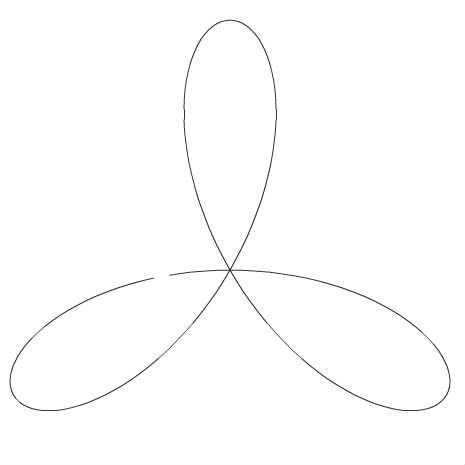
正葉曲線
♥0 |
Line 108 |
Modified 2009-08-19 09:03:58 |
MIT License
archived:2017-03-10 11:21:55
ActionScript3 source code
/**
 * Copyright mmlemon_ ( http://wonderfl.net/user/mmlemon_ )
 * MIT License ( http://www.opensource.org/licenses/mit-license.php )
 * Downloaded from: http://wonderfl.net/c/j2zm
 */

package {
    import flash.display.Sprite;
    import flash.display.Shape;
	import flash.events.Event;
	import flash.events.MouseEvent;
	import flash.events.KeyboardEvent;
	import flash.ui.Keyboard;
	import flash.geom.Point;
    [SWF(backgroundColor=0x0,frameRate=60,width=465,height=490)]
    public class RoseCurve extends Sprite {
        // 中心座標
		private static const CENTER:Point = new Point(230, 270);
		// 円を内包するコンテナ
		private var container:Sprite;
		// enterframe毎にインクリメントするカウンター
		private var c:int = 0;

		// 媒介変数のa
		private var a:Number = 1;
		// 媒介変数のn。これが変わると形状が変化します。
		private var n:int = 3;

		// 図形の大きさ
		private var radius:Number = 200;


		// -------------------------------------->> 曲線の公式
		// 正葉曲線を描きます。
		// 媒介変数で表現すると、
		// x = a * sin(nθ)* cos(θ), y = a * sin(nθ) * sin(θ)
		// です。
		private function getRoseCurvePos(rad:Number):Point
		{
			var res:Point = new Point();
			res.x = a * Math.sin(n * rad) * Math.cos(rad) * radius + CENTER.x;
			res.y = a * Math.sin(n * rad) * Math.sin(rad) * radius + CENTER.y;
			return res;
		}

		// <<-------------------------------------- 曲線の公式
        public function RoseCurve() {
            // write as3 code here..
            init();
            initEvent();
        }
        // 初期化。グラフ図形と円を一つ作成します。
		private function init():void
		{
			drawLine();
			container = new Sprite();
			addChild(container);
			var sp:Shape = genCircle();
			container.addChild(sp);
		}

		// グラフ図形を描画します。
		private function drawLine():void
		{
			this.graphics.clear();
			this.graphics.lineStyle(1, 0x333333);
			var zeroPos:Point = getRoseCurvePos(0);
			this.graphics.moveTo(zeroPos.x, zeroPos.y);
			for(var i:uint=1; i < 360; i++)
			{
				var rad:Number = i * Math.PI / 180;
				var pos:Point = getRoseCurvePos(rad);
				this.graphics.lineTo(pos.x, pos.y);
			}
			this.graphics.endFill();
		}

		// イベントの設定
		private function initEvent():void
		{
			addEventListener(Event.ENTER_FRAME, onLoop, false, 0, false);
			stage.addEventListener(KeyboardEvent.KEY_DOWN, keyDownHandler, false, 0, false);
			stage.addEventListener(MouseEvent.CLICK, clickHandler, false, 0, false);
		}

		// 普通にクリックすると円が増えて、shiftを押しながらクリックすると円が減ります。
		private function clickHandler(event:MouseEvent):void
		{
			if(!event.shiftKey)
			{
				var sp:Shape = genCircle();
				container.addChild(sp);
			}
			else
			{
				if(container.numChildren >= 1)
				{
					container.removeChildAt(0);
				}
			}
		}

		// キーボードの上を押すと nが増えて、下を押すとnが減ります。
		private function keyDownHandler(event:KeyboardEvent):void
		{
			switch(event.keyCode)
			{
				case Keyboard.UP:
					n++;
					break;
				case Keyboard.DOWN:
					n--;
					break;
			}
			graphics.clear();
			drawLine();
		}

		// 円を作成して返します。
		private function genCircle(_col:uint=0xffffff):Shape
		{
			var sp:Shape = new Shape();
			sp.graphics.beginFill(_col, 1);
			sp.graphics.drawCircle( -10, -10, 20);
			sp.graphics.endFill();
			sp.width = sp.height = 20;
			return sp;
		}


		private function onLoop(event:Event):void
		{
			var len:uint = container.numChildren;
			for(var i:uint = 0; i < len; i++)
			{
				var rad:Number = (i*(360/len)+c) * Math.PI / 180;
				var sp:Shape = container.getChildAt(i) as Shape;
				var pos:Point = getRoseCurvePos(rad);
				sp.x = pos.x;
				sp.y = pos.y;
			}
			c++;
		}
    }
}