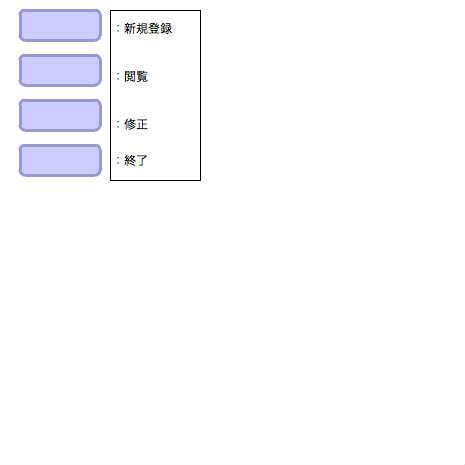
作成中:ボタンと入力/保存のサンプル
fl.controls.Buttonのボタンはwonderflでは枠が表示されないため、急遽flash.display.SImpleButtonを使うことにした。

よく理解はしていない。

値(文字)を入力させて、それを配列に格納させ、表示/編集するプログラムにする予定。

2010/11/08から
♥0 |
Line 71 |
Modified 2010-11-08 23:17:24 |
MIT License
archived:2017-03-20 13:50:58
ActionScript3 source code
/**
 * Copyright Nowloading_ ( http://wonderfl.net/user/Nowloading_ )
 * MIT License ( http://www.opensource.org/licenses/mit-license.php )
 * Downloaded from: http://wonderfl.net/c/ho5c
 */

package {
    import flash.display.Sprite;
    import flash.text.TextField;
    import flash.text.TextFormatAlign;
    import flash.text.TextFormat;

    [SWF(width=465, height=465, backgroundColor=0xeeeeee)]

    public class SimpleButtonExample extends Sprite {
        private var button1:CustomSimpleButton;
        private var button2:CustomSimpleButton;
        private var button3:CustomSimpleButton;
        private var button4:CustomSimpleButton;
        private var text1:TextField;

        public function SimpleButtonExample() {
            button1 = new CustomSimpleButton();
            button2 = new CustomSimpleButton();
            button3 = new CustomSimpleButton();
            button4 = new CustomSimpleButton();
            addChild(button1);
            addChild(button2);
            button2.y = 45;
            addChild(button3);
            button3.y = 90;
            addChild(button4);
            button4.y = 135;

            text1 = new TextField();
            text1.text = "\n:新規登録\n\n\n\n:閲覧\n\n\n\n:修正\n\n\n:終了";
            text1.x = 110;
            text1.width = 90;
            text1.height = 170;
            text1.y = 10;
            text1.border=true;
            stage.addChild(text1);
        }
    }
}

import flash.display.DisplayObject;
import flash.display.Shape;
import flash.display.SimpleButton;

class CustomSimpleButton extends SimpleButton {
    private var upColor:uint   = 0xccccff;
    private var overColor:uint = 0xd5d5FF;
    private var downColor:uint = 0xbbbbFF;
    private var cx:uint      = 80;
    private var cy:uint      = 30;

    public function CustomSimpleButton() {
        downState      = new ButtonDisplayState(downColor, cx, cy);
        overState      = new ButtonDisplayState(overColor, cx, cy);
        upState        = new ButtonDisplayState(upColor, cx, cy);
        hitTestState   = new ButtonDisplayState(upColor,  cx, cy);
        hitTestState.x = 0;
        hitTestState.y = 0;
        useHandCursor  = true;
    }
}

class ButtonDisplayState extends Shape {
    private var bgColor:uint;
    private var cx:uint;
    private var cy:uint;

    public function ButtonDisplayState(bgColor:uint, cx:uint, cy:uint) {
        this.bgColor = bgColor;
        this.cx    = cx;
        this.cy    = cy;
        draw();
    }

    private function draw():void {
        graphics.lineStyle(3,0x9999cc);
        graphics.beginFill(bgColor);
        graphics.drawRoundRect(20, 10, cx, cy, 10);
        graphics.endFill();
    }
}