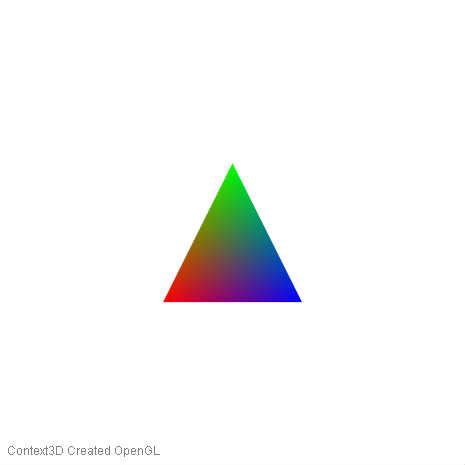
/**
 * Copyright WLAD ( http://wonderfl.net/user/WLAD )
 * MIT License ( http://www.opensource.org/licenses/mit-license.php )
 * Downloaded from: http://wonderfl.net/c/gBJo
 */

/// @mxmlc -swf-version 20
package
{
	import com.adobe.utils.AGALMiniAssembler;
	import flash.display.BitmapData;
	import flash.display.Graphics;
	import flash.display.Sprite;
	import flash.display3D.Context3DProgramType;
	import flash.display3D.Context3DVertexBufferFormat;
	import flash.display3D.IndexBuffer3D;
	import flash.display3D.Program3D;
	import flash.display3D.VertexBuffer3D;
	import flash.utils.ByteArray;

	[SWF(width='465', height='465')]
	public class Stage3D_Tutorial_3_gBJo extends Sprite
	{
		public function Stage3D_Tutorial_3_gBJo()
		{
			var S:StageUtil = new StageUtil( stage );

			var G:Graphics = this.graphics;
			var B:BitmapData = new BitmapData( S.W, S.H, true, 0 );

			// wait for Stage3D to provide us a Context3D
			// first param [true] is for error reporting
			// By enabling the Error reporting, you can get some valuable
			// information about errors in your shaders
			// But it also dramatically slows down your program.
			S.onContext3D( true, function():void {
// ---------------------------------------------------------------------------------
// ---------------------------------------------------------------------------------
// ---------------------------------------------------------------------------------


////////////////////////////////////////////////
// ### [1]: Allocation - program compilation.
////////////////////////////////////////////////

// CREATE BUFFERS //

// How much Vertex it will have : 3
// How much information each Vertex have : x,y,z,r,g,b = 6
var vertexBuffer:VertexBuffer3D = S.Context.createVertexBuffer( 3, 6 );
// The index buffer needs to know how many instruction he will have. Here 3.
var indexBuffer:IndexBuffer3D = S.Context.createIndexBuffer( 3 );

// CREATE SHADER PROGRAM //

// When you call the createProgram method you are actually allocating
// some V-Ram space for your shader program.
var program:Program3D = S.Context.createProgram();

// Create an AGALMiniAssembler //

// The MiniAssembler is an Adobe tool that uses a simple
// Assembly-like language to write and compile your shader into bytecode
var assembler:AGALMiniAssembler = new AGALMiniAssembler();

// VERTEX SHADER //

var code:String = "";
// Move the Vertex Attribute 0 (va0), which is our Vertex
// Coordinate, to the Output Point (op)
code += "mov op, va0" + "\n";
// Move the Vertex Attribute 1 (va1), which is our Vertex
// Color, to the variable register (v0)
// Variable register are memory space shared between your
// Vertex Shader and your Fragment Shader
code += "mov v0, va1" + "\n";

// COMPILE //

// Compile our AGAL Code into ByteCode using the MiniAssembler
var vertexShader:ByteArray =
assembler.assemble(Context3DProgramType.VERTEX, code);

// Move the Variable register 0 (v0) where we copied our
// Vertex Color, to the output color (oc)
code = "mov oc, v0\n";

// Compile our AGAL Code into Bytecode using the MiniAssembler
var fragmentShader:ByteArray =
assembler.assemble(Context3DProgramType.FRAGMENT, code);

///////////////////////////////////////////////
// ### [2]: Upload program and buffers data.
///////////////////////////////////////////////

// UPLOAD TO GPU PROGRAM //

// Upload the combined program to the video Ram
program.upload(vertexShader, fragmentShader);

// Upload some data to the vertex and index buffers
var vertexData:Vector.<Number>=Vector.<Number>([
	-0.3, -0.3, +0.0, +1.0, +0.0, +0.0, 	// 1st vertex x,y,z,r,g,b
	+0.0, +0.3, +0.0, +0.0, +1.0, +0.0, 	// 2nd vertex x,y,z,r,g,b
	+0.3, -0.3, +0.0, +0.0, +0.0, +1.0		// 3rd vertex x,y,z,r,g,b
]);
vertexBuffer.uploadFromVector(vertexData, 0, 3);
indexBuffer.uploadFromVector(Vector.<uint>([0, 1, 2]), 0, 3);

//////////////////////////////////////////////////////////
// ### [3]: Split chunk of data and set active program.
//////////////////////////////////////////////////////////

// Define how each Chunck of Data should be split and upload
// to fast access register for our AGAL program

// So here, basically, your telling your GPU that for each
// Vertex with a vertex being x,y,y,r,g,b
// you will copy in register "0", from the buffer "vertexBuffer,
// starting from the postion "0" the FLOAT_3 next number
S.Context.setVertexBufferAt(0, vertexBuffer, 0, Context3DVertexBufferFormat.FLOAT_3);
// register "0" now contains x,y,z

// Here, you will copy in register "1" from "vertexBuffer",
// starting from index "3", the next FLOAT_3 numbers
S.Context.setVertexBufferAt(1, vertexBuffer, 3, Context3DVertexBufferFormat.FLOAT_3);
// register 1 now contains r,g,b

// Define the active program to run on our GPU
// Set our program as the current active one
S.Context.setProgram(program);

//////////////////////////////////////////////////////////
// ### [4]: Start the rendering loop.
//////////////////////////////////////////////////////////

//Called each frame, Render the scene
S.on('enterFrame', function():void
{
	// Clear the backbuffer by filling it with the given color
	S.Context.clear(1, 1, 1, 1);
	// Draw the triangle according to the indexBuffer instructions into the backbuffer
	S.Context.drawTriangles(indexBuffer);
	// TEMP ( take screen shot )
	if ( takescreenshot )
	{
		S.Context.drawToBitmapData( B );
		takescreenshot = false;
		readyscreenshot = true;
	}
	// render the backbuffer on screen.
	S.Context.present();
});
// ---------------------------------------------------------------------------------
// ---------------------------------------------------------------------------------
// ---------------------------------------------------------------------------------
			});

			var takescreenshot:Boolean = false;
			var readyscreenshot:Boolean = false;

			S.on('click', function():void {
				if ( ! readyscreenshot ) return;
				G.clear();
				G.beginBitmapFill( B );
				G.drawRect( 0, 0, S.W, S.H );
				G.endFill();
			});

			S.on('rightMouseDown', function():void {
				G.clear();
				takescreenshot = true;
			} );
			S.on('doubleClick', function():void {

				S.toogleFullScreen();
			});

		} // end constractor
	} // end class
} // end package

import flash.display.Stage;
import flash.display3D.Context3D;
import flash.geom.Rectangle;
import flash.text.TextField;
import flash.text.TextFormat;

class StageUtil
{
	/// Context3D
	public var Context:Context3D = null;

	//
	public function onContext3D( errorReporting:Boolean = false, callBack:Function = null ):void
	{
		if ( callBack == null ) return;
		if( errorReporting )
		stage.stage3Ds[0].addEventListener('error', function( e:* ):void {
			text( "Context3D Error", e.text );
		});
		stage.stage3Ds[0].addEventListener('context3DCreate', function( e:* ):void {
			Context = stage.stage3Ds[0].context3D;
			Context.enableErrorChecking = errorReporting;
			// Configure the back buffer, in width and height. You can also specify the antialiasing
			// The backbuffer is the memory space where your final image is rendered.
			Context.configureBackBuffer( W, H, 4, true );
			callBack();
			text( "Context3D Created " + Context.driverInfo  );
		});stage.stage3Ds[0].requestContext3D();
	}


	/// stage width
	public var W:int;
	/// stage height
	public var H:int;
	/// Array of pressed keys
	public var K:Vector.<Boolean>;

	private var stage:Stage;
	public function StageUtil( stage:Stage ):void
	{
		this.stage = stage;

		stage.color = 0xFFFFFF;

		W = stage.stageWidth;
		H = stage.stageHeight;

		stage.doubleClickEnabled = true;

		// Keyboard control
		K = new Vector.<Boolean>();
		for (var k:int = 0; k < 2000; k++) K.push( false );
		var input:Function = function( e:* ):void
		{K[ e.keyCode ] = e.type == "keyDown";};
		stage.addEventListener('keyDown', input );
		stage.addEventListener('keyUp', input );
	}

	public function toogleFullScreen():void
	{
		if ( stage.displayState == 'normal' )
		{
			stage.fullScreenSourceRect = new Rectangle( 0, 0, W, H );
			stage.displayState = 'fullScreen';
		}
		else stage.displayState = 'normal';
	}

	public function on( event:String, callBack:Function, once:Boolean = false ):void
	{
		var capture:Function = function(e:*):void {
			if ( once ) stage.removeEventListener( event, capture );
			callBack();
		};
		stage.addEventListener( event, capture );
	}

	private var label:TextField;
	public function text( ...arguments ):void
	{
		if ( label == null )
		{
			label = new TextField();
			label.x = 5;
			label.autoSize = 'left';
			label.mouseEnabled = false;
			label.alpha = 0.5;
			label.defaultTextFormat = new TextFormat("Arial", 12, 0x000000 );
			stage.addChild( label );
		}
		label.appendText( arguments.join("\n") + "\n" );
		label.y = H - label.height - 5;
	}
}