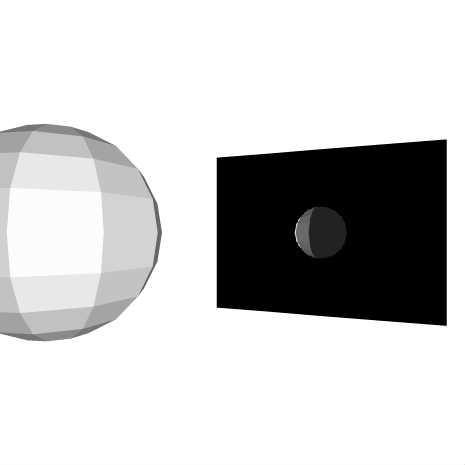
2カメを使う練習
Camera3Dでcamera2を作成 それを配置して、そこから見える映像(球体を映したもの)をPlaneに表示させる。
♥0 |
Line 36 |
Modified 2011-08-28 00:50:52 |
MIT License
archived:2017-03-20 13:49:14
ActionScript3 source code
/**
 * Copyright Nowloading_ ( http://wonderfl.net/user/Nowloading_ )
 * MIT License ( http://www.opensource.org/licenses/mit-license.php )
 * Downloaded from: http://wonderfl.net/c/brJJ
 */

package {
    import org.papervision3d.materials.*;
    import org.papervision3d.materials.shadematerials.*;
    import org.papervision3d.objects.primitives.*;
    import org.papervision3d.view.*;
    import org.papervision3d.lights.*;
    import org.papervision3d.cameras.*;
    import flash.events.Event;
    [SWF(backgroundColor = 0x999999)]
    public class twoCameras extends BasicView {
        public function twoCameras() {
            init();
        }
        private function init():void{
            var light:PointLight3D = new PointLight3D();
            var material:FlatShadeMaterial = new FlatShadeMaterial(light, 0xffffff, 0x222222);
            var sphere:Sphere = new Sphere(material,300,10,10);
            sphere.x = -500;
            scene.addChild(sphere);

            //二台目カメラ
            var camera2:Camera3D = new Camera3D();
            camera2.target = sphere;

            var bmpViewport:BitmapViewport3D = new BitmapViewport3D();
            var mirormat:BitmapViewportMaterial = new BitmapViewportMaterial(bmpViewport,true);
            var mirorobj:Plane = new Plane(mirormat, 1280,960);
            mirorobj.rotationY = 20;

            mirorobj.z = camera2.z = 1000;
            mirorobj.x = camera2.x = 500;
            scene.addChild(mirorobj);


            startRendering();
            addEventListener(Event.ENTER_FRAME, function(e:Event):void{
                sphere.rotationY += 0.5;
                renderer.renderScene(scene,camera2,bmpViewport);
            })
        }
    }
}