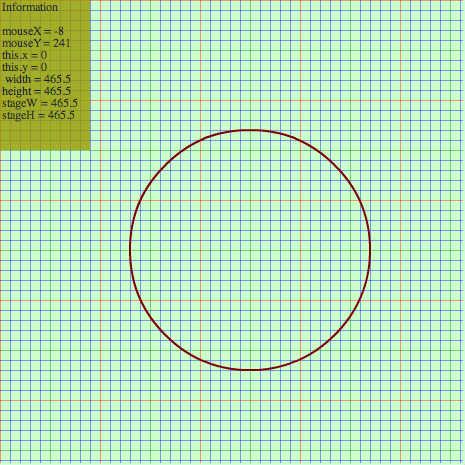
勉強中 (flash on 2010-3-5)
ステージの align と scaleMode を スクリプト内で
あらわに指定してみた.  手書き HTML 派にはどうやら
これが必要と思われる
(objectタグで埋め込んだとき無駄な余白が出ないようにするため)
♥0 |
Line 60 |
Modified 2010-03-06 00:16:57 |
MIT License
archived:2017-03-20 07:19:33
ActionScript3 source code
/**
 * Copyright tenasaku ( http://wonderfl.net/user/tenasaku )
 * MIT License ( http://www.opensource.org/licenses/mit-license.php )
 * Downloaded from: http://wonderfl.net/c/JQak
 */

package {
	// ステージの align と scaleMode を スクリプト内で
	// あらわに指定してみた.  手書き HTML 派にはどうやら
	// これが必要と思われる
	// (objectタグで埋め込んだとき無駄な余白が出ないようにするため)
	import flash.display.*;
	import flash.events.Event;
	import flash.events.MouseEvent;
	import flash.text.TextField;
	public class MouseReporter extends Sprite {
		private var _tf:TextField;
		public function MouseReporter():void {
			// ステージを描画領域の左上隅に合せる
			stage.align = StageAlign.TOP_LEFT;
			// 縮尺しない (クロップされる可能性がある)
			stage.scaleMode = StageScaleMode.NO_SCALE;
			// 以降は, テキトーに何か描画させてみた, というだけ
			this.graphics.clear();
			this.graphics.beginFill(0xccffcc);
			this.graphics.drawRect(0,0,465,465);
			this.graphics.endFill();
			var i:int = 0;
			while ( i <= 460 ) {
				if ((i%100) == 0) {
					this.graphics.lineStyle(1,0xff0000,0.4);
				} else {
					if ((i%50) == 0) {
					this.graphics.lineStyle(1,0x008000,0.4);
					} else {
						this.graphics.lineStyle(1,0x0000ff,0.4);
					}
				}
				this.graphics.moveTo(0,i);
				this.graphics.lineTo(463,i);
				this.graphics.moveTo(i,0);
				this.graphics.lineTo(i,463);
				i += 10;
			}
			this.graphics.lineStyle(2,0x800000);
			this.graphics.drawCircle(250,250,120);
			_tf = new TextField();
			_tf.x = 0;
			_tf.y = 0;
			_tf.width = 90;
			_tf.height = 150;
			_tf.background = true;
			_tf.backgroundColor = 0x999900;
			_tf.alpha = 0.8;
			stage.addChild(_tf);
			stage.addEventListener(Event.ENTER_FRAME, show_report);
			stage.addEventListener(MouseEvent.CLICK, handle_click);
		}
		private function show_report(e:Event):void {
			_tf.text = "Information\n\n";
			_tf.appendText("mouseX = " + String(stage.mouseX) + "\n");
			_tf.appendText("mouseY = " + String(stage.mouseY) + "\n");
			_tf.appendText("this.x = " + String(this.x) + "\n");
			_tf.appendText("this.y = " + String(this.y) + "\n");
			_tf.appendText(" width = " + String(this.width) + "\n");
			_tf.appendText("height = " + String(this.height) + "\n");
			_tf.appendText("stageW = " + String(stage.width) + "\n");
			_tf.appendText("stageH = " + String(stage.height) + "\n");
		}
		private function handle_click(e:MouseEvent):void {
			// do nothing for now
		}
	}
}