AS3Basic2
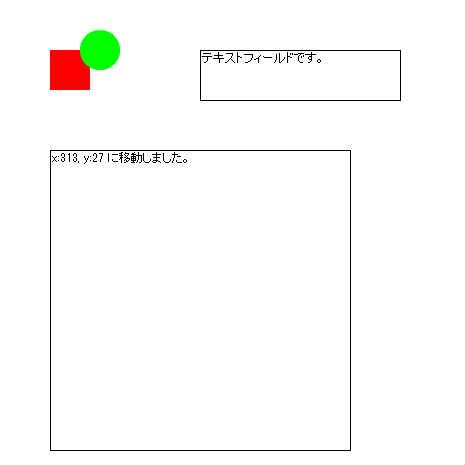
描画オブジェクトを配置します。マウスの座標を取得します。
♥0 |
Line 76 |
Modified 2016-01-15 12:20:37 |
MIT License
archived:2017-03-20 11:11:35
ActionScript3 source code
/**
 * Copyright umhr ( http://wonderfl.net/user/umhr )
 * MIT License ( http://www.opensource.org/licenses/mit-license.php )
 * Downloaded from: http://wonderfl.net/c/C3CH
 */

package
{
    import flash.display.Shape;
    import flash.display.Sprite;
    import flash.events.MouseEvent;
    import flash.text.TextField;

    /**
     * 描画オブジェクトを配置します。マウスの座標を取得します。
     * ...
     * @author umhr
     */
    public class AS3Basic2 extends Sprite
    {
        // プライベート変数。
        private var _logTextField:TextField = new TextField();

        public function AS3Basic2()
        {
            // 赤い四角を描く
            var rect:Shape = new Shape();
            rect.graphics.beginFill(0xFF0000);
            rect.graphics.drawRect(0, 0, 40, 40);
            rect.graphics.endFill();
            rect.x = 50;
            rect.y = 50;
            // 表示オブジェクトに登録
            addChild(rect);

            // 緑色の丸を描く
            var ball:Shape = new Shape();
            ball.graphics.beginFill(0x00FF00);
            ball.graphics.drawCircle(0, 0, 20);
            ball.graphics.endFill();
            ball.x = 100;
            ball.y = 50;
            // 表示オブジェクトに登録。rectよりも後に登録するので、
            // rectよりも上に描画されます。
            addChild(ball);

            // TextFieldはテキストを表示する表示オブジェクトです。
            var myTextField:TextField = new TextField();
            myTextField.text = "テキストフィールドです。";
            myTextField.border = true;
            myTextField.width = 200;
            myTextField.height = 50;
            myTextField.x = 200;
            myTextField.y = 50;
            addChild(myTextField);


            _logTextField.text = "マウスイベントをココで確認します。";
            _logTextField.width = 300;
            _logTextField.height = 300;
            _logTextField.border = true;
            _logTextField.multiline = _logTextField.wordWrap = true;
            _logTextField.x = 50;
            _logTextField.y = 150;
            addChild(_logTextField);

            // ステージ上でマウスクリックしたら実行されるイベントを登録。
            stage.addEventListener(MouseEvent.CLICK, stage_click);

            // ステージ上でマウスを押下したら実行されるイベントを登録。
            stage.addEventListener(MouseEvent.MOUSE_DOWN, stage_mouseDown);

            // ステージ上でマウスを押上たら実行されるイベントを登録。
            stage.addEventListener(MouseEvent.MOUSE_UP, stage_mouseUp);

            stage.addEventListener(MouseEvent.MOUSE_MOVE, stage_mouseMove);

        }

        private function stage_click(e:MouseEvent):void
        {
            // マウスの位置を取得します。
            var tx:Number = mouseX;
            var ty:Number = mouseY;
            // テキストを追加します。
            _logTextField.appendText("x:" + tx + ", y:" + ty + " でマウスクリックされました。");
        }

        private function stage_mouseDown(e:MouseEvent):void
        {
            var tx:Number = mouseX;
            var ty:Number = mouseY;
            // 新しいテキストを設定します。
            _logTextField.text = "x:" + tx + ", y:" + ty + " でマウスダウンされました。\n";
        }

        private function stage_mouseUp(e:MouseEvent):void
        {
            var tx:Number = mouseX;
            var ty:Number = mouseY;
            _logTextField.appendText("x:" + tx + ", y:" + ty + " でマウスアップされました。\n");
        }

        private function stage_mouseMove(e:MouseEvent):void
        {
            var tx:Number = mouseX;
            var ty:Number = mouseY;
            if(e.buttonDown){
                _logTextField.appendText("x:" + tx + ", y:" + ty + " にボタンが押されたまま移動しました。\n");
            }else {
                _logTextField.text = "x:" + tx + ", y:" + ty + " に移動しました。";
            }
        }


    }

}