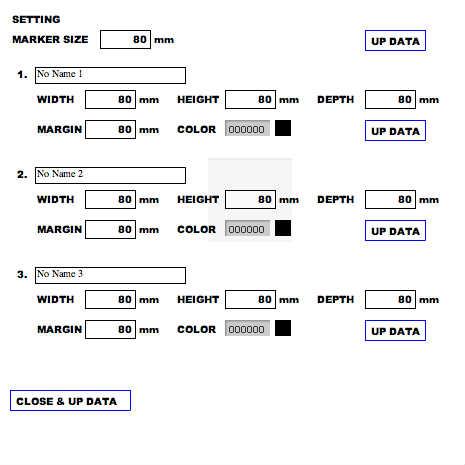
/**
 * Copyright barmamutha ( http://wonderfl.net/user/barmamutha )
 * MIT License ( http://www.opensource.org/licenses/mit-license.php )
 * Downloaded from: http://wonderfl.net/c/9NIz
 */

package{
    //import flash.packge
    import flash.display.MovieClip;
    import flash.text.TextField;
    import flash.events.*;
    //import pv3d
    import org.papervision3d.materials.*;
    import org.papervision3d.view.Viewport3D;
    import org.papervision3d.scenes.Scene3D;
    import org.papervision3d.cameras.Camera3D;
    import org.papervision3d.materials.shadematerials.FlatShadeMaterial;
    import org.papervision3d.materials.ColorMaterial;
    import org.papervision3d.objects.DisplayObject3D;
    import org.papervision3d.objects.primitives.Plane;
    import org.papervision3d.materials.utils.MaterialsList;
    import org.papervision3d.materials.*;
    import org.papervision3d.objects.primitives.Cube;
    import org.papervision3d.render.BasicRenderEngine;
    import org.papervision3d.lights.*;
    import org.papervision3d.view.layer.ViewportLayer;
    import org.papervision3d.core.geom.Vertices3D;

    import org.libspark.betweenas3.BetweenAS3;
    import org.libspark.betweenas3.tweens.ITween;
    import org.libspark.betweenas3.easing.*;

    [SWF(width="465", height="465", frameRate="24", backgroundColor="#66CCCC")]

    public class Pv3dTest extends MovieClip{

        private var viewport:    Viewport3D;
        private var scene:         Scene3D;
        private var camera:         Camera3D;
        private var material:    ColorMaterial;
        private var light:        PointLight3D;
        private var primitive:    Plane;
        private var renderer:    BasicRenderEngine;
        private var cube:    Cube;
        private var viewLay:ViewportLayer

        private var planeArray:    Array;

        // マウスを押した状態かどうかを判別するフラグ
        private var isMouseDown:Boolean = false

        // 一時的なマウスの値を格納する変数
        private var oldX:Number = 0
        private var oldY:Number = 0
        private var targetRot:Number = 0
        private var targetRotY:Number = 0
        private var rot:Number = 0 // 角度
        private var rotY:Number = 0 // 角度
        private var menu:MenuScreen;
        public var MARKER_Scale:Number = 1;
        public function Pv3dTest(){
            viewport = new Viewport3D(500, 400, false, true);
            addChild(viewport);


            scene = new Scene3D();

            camera = new Camera3D();

            renderer = new BasicRenderEngine();

            var light:PointLight3D = new PointLight3D();
            light.x = 0;
            light.y = 1000;
            light.z = -1000;

            var wmat:WireframeMaterial = new WireframeMaterial(0xff0000, 1, 2); // with wireframe. / ワイヤーフレームで。
            var _plane = new Plane(wmat, 100, 100); // 80mm x 80mm。
            _plane.rotationX = 180;
            scene.addChild(_plane);


            // Create Cube.
            // Cube を作る。
            //var material:WireframeMaterial = new WireframeMaterial(0xFF0000)
            var fmat:FlatShadeMaterial = new FlatShadeMaterial(light, 0xFFFFFF, 0x999999); // Color is ping. / 青色。
            cube = new Cube(new MaterialsList({all: fmat}), 80, 80, 80); // 40mm x 40mm x 40mm
            //cube.z = 50;
            for each (var v in cube.geometry.vertices) {
                v.z += 40;
            }
            cube.z = 30;
            scene.addChild(cube);

            viewLay = viewport.getChildLayer(cube);

            camera.target = _plane;


            // イベントの設定
            stage.addEventListener(MouseEvent.MOUSE_DOWN, downHandler)
            stage.addEventListener(MouseEvent.MOUSE_UP, upHandler)
            stage.addEventListener(MouseEvent.MOUSE_MOVE, moveHandler)


            // アニメーション
            //var rot:Number = 0 // 角度
            addEventListener(Event.ENTER_FRAME, function(e){

                rot += (targetRot - rot) * 0.5
                rotY += (targetRotY - rotY) * 0.5

                // 角度に応じてカメラの位置を設定
                camera.x = 300 * Math.sin(rot * Math.PI / 180)
                camera.y = 300 * Math.sin(rotY * Math.PI / 180)
                camera.z = -300 * Math.cos(rot * Math.PI / 180)

                renderer.renderScene(scene, camera, viewport);
            })
            menu = new MenuScreen(this)
            addChild(menu);
        }
        public function downHandler(e){
            isMouseDown = true
            oldX = mouseX
            oldY = mouseY
        }
        public function upHandler(e){
            isMouseDown = false
        }

        public function moveHandler(e){
            if(isMouseDown){
                var dy:Number = e.stageX - oldX
                var dx:Number = e.stageY - oldY
                targetRot += dy * 0.25
                targetRotY += dx * 0.25
                oldX = e.stageX
                oldY = e.stageY
            }
        }
        public function upDate(size:Object){
            var _red   : uint = (size.color >> 16) & 0xFF;
            var _green : uint = (size.color >>  8) & 0xFF;
            var _blue  : uint = (size.color >>  0) & 0xFF;
            BetweenAS3.parallel(
                BetweenAS3.tween( viewLay, { transform: { colorTransform: {redMultiplier:1,greenMultiplier:1,blueMultiplier:1, redOffset:_red-255, greenOffset:_green-255, blueOffset:_blue-255 }}},null, 1 ),
                BetweenAS3.tween( cube, { scaleX:(size.width/80)*MARKER_Scale, scaleY:(size.height/80)*MARKER_Scale, scaleZ:(size.depth/80)*MARKER_Scale, z:size.margin*MARKER_Scale},null, 1 )
            ).play()
        }


    }
}
import flash.display.*;
import flash.text.*;
import flash.events.*;

import com.bit101.components.ColorChooser;
import com.bit101.components.Panel;
/*
import fl.controls.ColorPicker;
import fl.controls.TextArea;
*/
import org.libspark.betweenas3.BetweenAS3;
import org.libspark.betweenas3.tweens.ITween;
import org.libspark.betweenas3.easing.*;

class MenuScreen extends MovieClip{

    public var openBtn:Sprite = new Sprite();
    public var selectBtn:SelectBtn;
    public var selectBtn2:SelectBtn;
    public var selectBtn3:SelectBtn;
    public var markerInput:InputTextField;
    public var activeSize:ModelSizeInputField;

    public var MARKER_Scale:Number = 1;

    private var _root:DisplayObjectContainer;
    public function MenuScreen(d:DisplayObjectContainer){
        _root = d;

        this.graphics.beginFill(0xffffff, 0.4);
        this.graphics.drawRect(2, 2, 461, 461);
        this.graphics.endFill();

        //ラベル
        var settingLabel:LabelTextField = addChild(new LabelTextField("SETTING")) as LabelTextField;
        settingLabel.x=10;
        settingLabel.y=10;


        var markerLabel:LabelTextField = addChild(new LabelTextField("MARKER SIZE")) as LabelTextField;
        markerLabel.x=10;
        markerLabel.y=30;


        markerInput= addChild(new InputTextField("80")) as InputTextField;
        markerInput.x=100;
        markerInput.y=30;


        var updateBtn:UpdateBtn = addChild(new UpdateBtn()) as UpdateBtn;
        updateBtn.x=365;
        updateBtn.y=30;

        var modelSizeInputField:ModelSizeInputField = addChild(new ModelSizeInputField(1)) as ModelSizeInputField;
        modelSizeInputField.x=10;
        modelSizeInputField.y=60;

        selectBtn = addChild(new SelectBtn(1)) as SelectBtn;
        selectBtn.x=365;
        selectBtn.y=10;
        selectBtn.clickHandler=modelSizeInputField.btn_clickHandler;

        var modelSizeInputField2:ModelSizeInputField = addChild(new ModelSizeInputField(2)) as ModelSizeInputField;
        modelSizeInputField2.x=10;
        modelSizeInputField2.y=160;

        selectBtn2 = addChild(new SelectBtn(2)) as SelectBtn;
        selectBtn2.x=385;
        selectBtn2.y=10;
        selectBtn2.clickHandler=modelSizeInputField2.btn_clickHandler;

        var modelSizeInputField3:ModelSizeInputField = addChild(new ModelSizeInputField(3)) as ModelSizeInputField;
        modelSizeInputField3.x=10;
        modelSizeInputField3.y=260;

        selectBtn3 = addChild(new SelectBtn(3)) as SelectBtn;
        selectBtn3.x=405;
        selectBtn3.y=10;
        selectBtn3.clickHandler=modelSizeInputField3.btn_clickHandler;

        var closeUpdateBtn:CloseUpdateBtn = addChild(new CloseUpdateBtn()) as CloseUpdateBtn;
        closeUpdateBtn.x=10;
        closeUpdateBtn.y=390;

        openBtn.buttonMode = true;
        openBtn.graphics.beginFill(0x0000FF, 0);
        openBtn.graphics.drawRect(5, 5, 120, 20);
        openBtn.graphics.endFill();
        addChild(openBtn);
        openBtn.addEventListener(MouseEvent.CLICK, openBtn_clickHandler);
        openBtn.visible=false;

        activeSize = modelSizeInputField;

    }
    public function openBtn_clickHandler(e:MouseEvent){
        openBtn.visible=false;
        selectBtn.visible=false;
        selectBtn2.visible=false;
        selectBtn3.visible=false;
        BetweenAS3.tween( this, { y:0},null, 0.5 ,Cubic.easeInOut ).play()
    }
    public function btn_clickHandler(){
        //マーカースケール変更
        MARKER_Scale = Number(markerInput.text()) / 80;
        _root["MARKER_Scale"] = MARKER_Scale;
        activeSize.btn_clickHandler()
    }
    public function closeUpDate(){
        btn_clickHandler()
        openBtn.visible=true;
        selectBtn.visible=true;
        selectBtn2.visible=true;
        selectBtn3.visible=true;
        BetweenAS3.tween( this, { y:435},null, 0.5, Cubic.easeInOut ).play()
    }
}
class LabelTextField extends TextField{
    private var textFormat:TextFormat = new TextFormat("Arial Black", 10, 0x000000);
    //font:String = null, size:Object = null, color:Object = null, bold:Object = null, italic:Object = null, underline:Object = null, url:String = null, target:String = null, align:String = null, leftMargin:Object = null, rightMargin:Object = null, indent:Object = null, leading:Object = null)
    public function LabelTextField(t:String){
        autoSize=TextFieldAutoSize.LEFT;
        defaultTextFormat = textFormat;
        height = 18;
        text = t;
    }
}
class InputTextField extends Sprite{
    private var textFormat:TextFormat = new TextFormat("Arial Black", 10, 0x000000, null, null, null, null, null, "right");
    //font:String = null, size:Object = null, color:Object = null, bold:Object = null, italic:Object = null, underline:Object = null, url:String = null, target:String = null, align:String = null, leftMargin:Object = null, rightMargin:Object = null, indent:Object = null, leading:Object = null)
    public var inputTextField:TextField = new TextField()
    public var tgtP:*
    public function InputTextField(t:String){
        this.graphics.beginFill(0xffffff, 0.5);
        this.graphics.drawRect(0, 0, 50, 18);
        this.graphics.endFill();

        inputTextField.defaultTextFormat = textFormat;
        inputTextField.border = true;
        inputTextField.width = 50;
        inputTextField.height = 18;
        inputTextField.type = TextFieldType.INPUT;
        inputTextField.text = t;
        inputTextField.addEventListener(FocusEvent.FOCUS_OUT, textInputHandler);
        addChild(inputTextField);
        var mm:LabelTextField = addChild(new LabelTextField("mm")) as LabelTextField;
        mm.x=52;
    }
    public function text():String{
        return inputTextField.text;
    }
    public function textInputHandler(e:Event){
        //trace(e.target.parent);
    }
}
class ModelSizeInputField extends MovieClip{
    private var textFormat:TextFormat = new TextFormat(null, 10, 0x000000);
    public var bg:Sprite = new Sprite();
    public var myData:Object = new Object();
    private var _id:uint
    public var idTextField:LabelTextField = new LabelTextField("0.");

    public var inputTextField:TextField = new TextField();
    public var widthInput:InputTextField = new InputTextField("80");
    public var heightInput:InputTextField = new InputTextField("80");
    public var depthInput:InputTextField = new InputTextField("80");
    public var marginInput:InputTextField = new InputTextField("80");
    public var colorChooser:ColorChooser;
    public function ModelSizeInputField(n:uint){
        _id = n;
        myData.id = n;
        bg.graphics.beginFill(0xffffff, 1);
        bg.graphics.drawRect(0, 0, 441, 90);
        bg.graphics.endFill();
        bg.alpha=0.5;
        addChild(bg);
        idTextField.x=5;
        idTextField.y=5;
        idTextField.text=_id+"."
        addChild(idTextField);

        inputTextField.defaultTextFormat = textFormat;
        inputTextField.border = true;
        inputTextField.width = 150;
        inputTextField.height = 16;
        inputTextField.type = TextFieldType.INPUT;
        inputTextField.text = "No Name " + _id;
        inputTextField.x=25;
        inputTextField.y=7;
        addChild(inputTextField);

        var widthLabel:LabelTextField = addChild(new LabelTextField("WIDTH")) as LabelTextField;
        widthLabel.x=25;
        widthLabel.y=30;

        widthInput.x=75;
        widthInput.y=30;
        addChild(widthInput);

        var heightLabel:LabelTextField = addChild(new LabelTextField("HEIGHT")) as LabelTextField;
        heightLabel.x=165;
        heightLabel.y=30;

        heightInput.x=215;
        heightInput.y=30;
        addChild(heightInput);

        var depthLabel:LabelTextField = addChild(new LabelTextField("DEPTH")) as LabelTextField;
        depthLabel.x=305;
        depthLabel.y=30;

        depthInput.x=355;
        depthInput.y=30;
        addChild(depthInput);

        var marginLabel:LabelTextField = addChild(new LabelTextField("MARGIN")) as LabelTextField;
        marginLabel.x=25;
        marginLabel.y=60;

        marginInput.x=75;
        marginInput.y=60;
        addChild(marginInput);

        var colorLabel:LabelTextField = addChild(new LabelTextField("COLOR")) as LabelTextField;
        colorLabel.x=165;
        colorLabel.y=60;


        colorChooser = new ColorChooser(this, 215, 60, 0x000000, colorChangeHandler);
        colorChooser.usePopup = true;
        //colorChooser.move(215,60);
        addChild(colorChooser);


        var updateBtn:UpdateBtn = addChild(new UpdateBtn()) as UpdateBtn;
        updateBtn.x=355;
        updateBtn.y=60;


    }
    private function colorChangeHandler(event:Event){
        /*
        var color:ColorChooser = event.currentTarget as ColorChooser;
        trace(color.value.toString(16).toUpperCase()); // 色(16進数で表示される)
        */
        trace(colorChooser.value.toString(16).toUpperCase());
    }
    public function btn_clickHandler(){
        //myData.neme =
        updateData();
        MovieClip(root).upDate(myData);
        this.parent["activeSize"] = this;

    }
    public function updateData(){
        myData.name = inputTextField.text;
        myData.width = Number(widthInput.text());
        myData.height = Number(heightInput.text());
        myData.depth = Number(depthInput.text());
        myData.margin = Number(marginInput.text());
        myData.color = Number(colorChooser.value);
    }
}
class UpdateBtn extends Sprite{
    public var _p:DisplayObject;
    public function UpdateBtn(){
        this.graphics.beginFill(0xFFFFFF, 0.7);
        this.graphics.lineStyle(1, 0x0000FF);
        this.graphics.drawRect(0, 0, 60, 20);
        this.graphics.endFill();

        var addLabel:LabelTextField = addChild(new LabelTextField("UP DATA")) as LabelTextField;
        addLabel.x=4;
        addLabel.y=2;

        var btn:Sprite = new Sprite();
        btn.buttonMode = true;
        btn.graphics.beginFill(0xFFFFFF, 0);
        btn.graphics.drawRect(0, 0, 60, 20);
        btn.graphics.endFill();
        addChild(btn);
        btn.addEventListener(MouseEvent.CLICK, btn_clickHandler);
        _p = this.parent;
    }
    public function btn_clickHandler(e:Event){
        MovieClip(parent).btn_clickHandler()
    }
}
class CloseUpdateBtn extends Sprite{
    public function CloseUpdateBtn(){
        this.graphics.beginFill(0xFFFFFF, 0.7);
        this.graphics.lineStyle(1, 0x0000FF);
        this.graphics.drawRect(0, 0, 120, 20);
        this.graphics.endFill();

        var addLabel:LabelTextField = addChild(new LabelTextField("CLOSE & UP DATA")) as LabelTextField;
        addLabel.x=4;
        addLabel.y=2;

        var btn:Sprite = new Sprite();
        btn.buttonMode = true;
        btn.graphics.beginFill(0xFFFFFF, 0);
        btn.graphics.drawRect(0, 0, 120, 20);
        btn.graphics.endFill();
        addChild(btn);
        btn.addEventListener(MouseEvent.CLICK, btn_clickHandler);
    }
    public function btn_clickHandler(e:Event){
        MovieClip(parent).closeUpDate()
    }
}
class SelectBtn extends Sprite{
    public var clickHandler:Function;
    public function SelectBtn(n:uint){
        this.graphics.beginFill(0xFFFFFF, 0.7);
        this.graphics.lineStyle(1, 0x0000FF);
        this.graphics.drawRect(0, 0, 15, 15);
        this.graphics.endFill();

        var addLabel:LabelTextField = addChild(new LabelTextField(String(n))) as LabelTextField;
        addLabel.x=2;
        addLabel.y=-1;

        var btn:Sprite = new Sprite();
        btn.buttonMode = true;
        btn.graphics.beginFill(0xFFFFFF, 0);
        btn.graphics.drawRect(0, 0, 15, 15);
        btn.graphics.endFill();
        addChild(btn);
        btn.addEventListener(MouseEvent.CLICK, btn_clickHandler);
        visible=false;
    }
    public function btn_clickHandler(e:Event){
        //this.parent.closeUpDate()
        clickHandler()
    }
}