13 - 残りブロック数の表示欄作成
forked from 12 - 孤立しているブロックは消せないようにする (diff: 49)
(問題点:残りブロック数の表示欄が欲しい)
* 解決
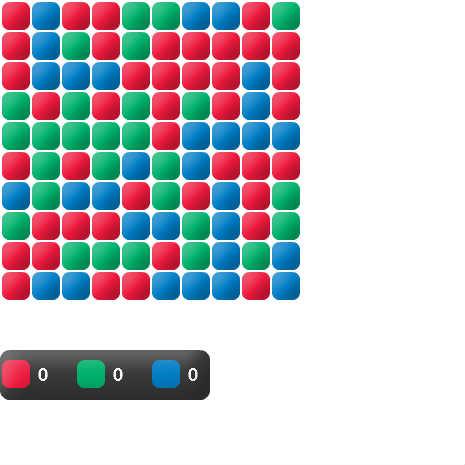
* CountPanelというクラスを作って残りブロック数の表示欄を作った。
*
* 問題点:ブロック数が0のまま。

ActionScript3 source code
/**
 * Copyright samegame ( http://wonderfl.net/user/samegame )
 * MIT License ( http://www.opensource.org/licenses/mit-license.php )
 * Downloaded from: http://wonderfl.net/c/93Xc
 */

/**
 * (問題点:残りブロック数の表示欄が欲しい)
 * 解決
 * CountPanelというクラスを作って残りブロック数の表示欄を作った。
 *
 * 問題点:ブロック数が0のまま。
 */
package
{
	import flash.display.Sprite;

	[SWF(backgroundColor = "0x0")]
	public class Main extends Sprite
	{
		public function Main()
		{
			var panel:Panel = new Panel();
			addChild(panel);
		}
	}
}

import flash.display.Sprite;
import flash.text.TextField;
import flash.text.TextFormat;
import flash.text.TextFieldAutoSize;
import flash.events.MouseEvent;
import flash.filters.BevelFilter;
import flash.geom.Point;
import org.libspark.betweenas3.BetweenAS3;

class Panel extends Sprite // ブロックはパネルに貼る
{
	public static const WIDTH:int = 10; 	// ブロックの数 - 横
	public static const HEIGHT:int = 10; 	// ブロックの数 - 縦

	private var blocks:Array; // ブロックが入っている配列(二次元配列)
	private var countPanel:CountPanel; // 残りブロック表示数を貼り付けているパネル

	public function Panel()
	{
		createBlocks();

		countPanel = new CountPanel(blocks);
		countPanel.y = Block.HEIGHT * HEIGHT; // 盤面の下へ配置
		addChild(countPanel);
	}

	// 二次元配列を作る。その配列にブロックを代入。
	private function createBlocks():void
	{
		blocks = new Array(WIDTH);

		for (var y:int = 0; y < HEIGHT; y++)
		{
			blocks[y] = new Array(HEIGHT);

			for (var x:int = 0; x < WIDTH; x++)
			{
				var block:Block = new Block();
				block.x = x * Block.WIDTH;
				block.y = y * Block.HEIGHT;
				addChild(block);

				blocks[y][x] = block;
			}
		}
	}

	// 二次元配列から引数のブロック位置を検索。
	// 見つかったらPoint(x, y)で返却。
	// 見つからなかったらnullを返す
	public function searchBlock(block:Block):Point
	{
		for (var y:int = 0; y < HEIGHT; y++)
		{
			for (var x:int = 0; x < WIDTH; x++)
			{
				if (blocks[y][x] == block)
				{
					return new Point(x, y); // ブロックが見つかったので、Pointで返却。
				}
			}
		}

		return null; // 見つからなかったのでnullを返す。
	}

	// ブロックを消す処理
	// block[ty][tx].colorが引数で渡されたcolorと同じなら削除
	// 上下左右のブロックを調べる
	public function deleteBlock(tx:int, ty:int, color:int):void
	{
		if (tx < 0 || WIDTH <= tx ||
			ty < 0 || HEIGHT <= ty) return; // 配列外ならリターン

		if (blocks[ty][tx] == null) return; // nullだったらリターン
		if (blocks[ty][tx].color != color) return; // クリックしたブロックの色と違っていたらリターン

		// 条件は満たしたのでブロックを消す
		removeChild(blocks[ty][tx]);
		blocks[ty][tx] = null;

		// 周りの色を調べる
		deleteBlock(tx - 1, ty, color); // 左へ
		deleteBlock(tx + 1, ty, color); // 右へ
		deleteBlock(tx, ty - 1, color); // 上へ
		deleteBlock(tx, ty + 1, color); // 下へ
	}

	// ブロックを消すと隙間が空くので縦に詰める処理
	// 左から右へ、下から上へ走査する
	public function verticalPackBlock():void
	{
		for (var x:int = 0; x < WIDTH; x++)
		{
			for (var y:int = HEIGHT - 1; y >= 0; y--)
			{
				if (blocks[y][x] == null) // 隙間が空いているブロックを見つけた
				{
					for (var yy:int = y - 1; yy >= 0; yy--) // その一つ上から縦に走査
					{
						if (blocks[yy][x] != null) // ブロックを見つけたので[y][x]まで詰めなければならない
						{
							blocks[y][x] = blocks[yy][x]; // 配列の位置を変更
							blocks[yy][x] = null;	// 元にあった位置は削除しておく

							// 0.3秒かけて下にずらす。
							BetweenAS3.tween(blocks[y][x], {y:y * Block.HEIGHT}, null, 0.3).play();

							break;
						}
					}
				}
			}
		}
	}

	// ブロックを消したとき、まるまる縦に一列空いてしまったら横に詰めなければならない。その処理がこのメソッド。
	// 最下段の左から右へ走査する
	public function horizonPackBlock():void
	{
		var y:int = HEIGHT - 1; // 一番下の段だけ走査

		for (var x:int = 0; x < WIDTH; x++)
		{
			if (blocks[y][x] == null) // 一番下の段に何もないということは、ここに右のブロックを詰めなければならない(端の可能性もあるけど
			{
				for (var xx:int = x + 1; xx < WIDTH; xx++) // その一つ右から走査。
				{
					if (blocks[y][xx] != null) // ブロックを見つけた
					{
						for (var yy:int = HEIGHT - 1; yy >= 0; yy--) // 縦の一段をまるまる左に詰める処理
						{
							if (blocks[yy][xx] == null) break; // もうずらすブロックがねーよ、ということでbreak

							blocks[yy][x] = blocks[yy][xx]; // 配列の位置を変更
							blocks[yy][xx] = null; // 元の位置にnullを入れておく

							// 0.3秒かけて左にずらす。
							BetweenAS3.tween(blocks[yy][x], {x:x * Block.WIDTH}, null, 0.3).play();
						}

						break;
					}
				}
			}
		}
	}

	// 周りに自分の色と同じマスが1つでもあったらtrue, なかったらfalse.
	public function colorCheck(tx:int, ty:int, color:int):Boolean
	{
		var check:Boolean = false;

		if (0 <= tx - 1 && blocks[ty][tx - 1] != null && blocks[ty][tx - 1].color == color) check = true;
		else if (tx + 1 < WIDTH && blocks[ty][tx + 1] != null && blocks[ty][tx + 1].color == color) check = true;
		else if (0 <= ty - 1 && blocks[ty - 1][tx] != null && blocks[ty - 1][tx].color == color) check = true;
		else if (ty + 1 < HEIGHT && blocks[ty + 1][tx] != null && blocks[ty + 1][tx].color == color) check = true;

		return check;
	}
}

class CountPanel extends Sprite // 残りブロック数を表示するクラス
{
	private var blocks:Array; // パネルから受け取ったブロックが入っている
	private var texts:Array;  // 表示用テキスト

	public function CountPanel(blocks:Array)
	{
		this.blocks = blocks;

		// ブロックのデザイン
		graphics.beginFill(0x393939);
		graphics.drawRoundRect(0, 50, 210, 50, 20, 20);
		graphics.endFill();

		texts = new Array();
		for (var i:int = 0; i < Color.COLORS.length; i++)
		{
			// ブロックを描画
			graphics.beginFill(Color.COLORS[i]);
			graphics.drawRoundRect(Block.WIDTH * i * 2.5 + Block.CW, Block.HEIGHT * 2, Block.WIDTH - Block.CW, Block.HEIGHT - Block.CH, Block.RW, Block.RH);
			graphics.endFill();

			this.filters = [new BevelFilter(4, 45, 0xFFFFFF, 1, 0x0, 1, 20, 20, 1, 3, "inner")];

			// 残り数を表示
			var tf:TextField = new TextField();
			tf.defaultTextFormat = new TextFormat("_typeWriter", 20, 0xFFFFFF, true);
			tf.text = "0";
			tf.x = Block.WIDTH + 5 + Block.WIDTH * i * 2.5;
			tf.y = Block.HEIGHT * 2 + 2;
			tf.selectable = false;
			addChild(tf);

			texts.push(tf);
		}
	}
}

class Block extends Sprite
{
	public static const WIDTH:int = 30; 	// ブロックの横幅
	public static const HEIGHT:int = 30; 	// ブロックの縦幅

	public static const CW:int = 2;			// 補正幅 - ブロック同士がくっつかないように
	public static const CH:int = 2;			// 補正縦

	public static const RW:int = 15;		// drawRoundRect()のellipseWidth
	public static const RH:int = 15;		// drawRoundRect()のellipseHeight

	public var color:int;					// 自分自身の色。といってもColorクラスのCOLORS配列indexをいれる。ブロック識別用。

	public function Block()
	{
		this.color = Math.random() * Color.COLORS.length; // colorは色番号を保持しておく。

		graphics.beginFill(Color.COLORS[this.color]); // ランダムで色を選ぶ
		graphics.drawRoundRect(CW, CH, WIDTH - CW, HEIGHT - CH, RW, RH);
		graphics.endFill();

		this.filters = [new BevelFilter(4, 45, 0xFFFFFF, 1, 0x0, 1, 20, 20, 1, 3, "inner")]; // ベベルフィルターでブロックに質感を持たせる

		addEventListener(MouseEvent.MOUSE_DOWN, onMouseDown); // ブロックをクリックしたらonMouseDown()を呼ぶ
	}

	private function onMouseDown(event:MouseEvent):void
	{
		var panel:Panel = this.parent as Panel; // ブロックはパネルに貼り付けるので、ブロックの親がパネルになる。this.parentで取得できる。

		var point:Point = panel.searchBlock(this); // ブロックの位置を検索
		if (point)
		{
			// 周りに自分と同じ色が無かったらクリックしたブロックを消すことが出来ないのでreturn
			if (!panel.colorCheck(point.x, point.y, this.color)) return;

			// 自分自身と周りのブロックを消す処理。
			// removeChild()と二次元配列から削除。
			// 上のparent.removeChild()を消して、panelに消す処理をまかせることにした。
			panel.deleteBlock(point.x, point.y, this.color) // 自分自身の位置から削除スタート。
			panel.verticalPackBlock(); // ブロックを消すと隙間が空くので縦に詰める処理
			panel.horizonPackBlock(); // 同じく横に詰める処理
		}
	}
}

// ブロックの色を保持している
class Color
{
	public static const COLORS:Array = [0xED1A3D, 0x00B16B, 0x007DC5];
}