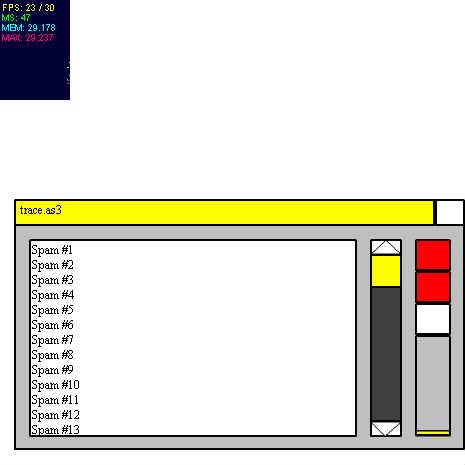
/**
* Copyright CatHobo ( http://wonderfl.net/user/CatHobo )
* MIT License ( http://www.opensource.org/licenses/mit-license.php )
* Downloaded from: http://wonderfl.net/c/80oJ
*/
package {
import flash.display.Sprite;
import flash.display.Stage;
import flash.events.Event;
import flash.events.MouseEvent;
import flash.utils.Dictionary;
import flash.system.System;
import net.hires.debug.Stats;
public class Main extends Sprite {
public function Main():void {
this.addChild(new Stats());
Console.INIT(this);
//Pass Main's (this) DisplayObject so that
//the Console can add Stuff and Events.
//Console.ClearAndPrint=true;
//Console.ScrollToEnd=true;
//Console.HideConsole=true;
//this.stage.frameRate=10;
this.stage.addEventListener(MouseEvent.MOUSE_MOVE,
function(e:MouseEvent):void{
mouse_x=e.stageX;
mouse_y=e.stageY;
});
//Using getter functions to get variables
//in the main class only.
//Using Console.TraceVariable inside other classes
//won't properly delete
//null object variables/methods (Typing someobject=null;).
Console.TraceVariable(this,function():int{return TracedVariable;},"TracedVariable");
Console.TraceVariable(this,function():int{return OtherTracedVariable;},"OtherTracedVariable");
Console.TraceVariable(this,function():int{return ReachingVariable;},"ReachingVariable");
Console.TraceVariable(this,function():Number{return mouse_x;},"YouMovedMouse.x");
Console.TraceVariable(this,function():Number{return mouse_y;},"YouMovedMouse.y");
Console.TraceVariable(this,function():String{return "To imitate trace().";},"Purpose");
Console.TraceVariable(this,function():int{return 500;},"Constant1");
Console.TraceVariable(this,function():int{return 600;},"Constant2");
Console.TraceVariable(this,NonAnonymousFunction,"Passing a non-anonymous getter function");
var someobject:Object={a:1,b:3};
Console.TraceVariable(someobject,function():int{return someobject.b;},"someobject.b");
//someobject=null;
var sc:SomeClass=new SomeClass();
Console.TraceVariable(sc,sc.TheBoundMethod,"SecretNumber");
//sc=null;
this.addEventListener(Event.ENTER_FRAME,ContinuousPrint);
//Continuously Print or update traced variables.
}
private function NonAnonymousFunction():int{return TracedVariable;}
private var sc2:SomeClass;
private var mouse_x:Number=0; private var mouse_y:Number=0;
private var TracedVariable:int=0;
private var OtherTracedVariable:int=0;
private var ReachingVariable:int=200;
private function ContinuousPrint(e:Event):void{
TracedVariable++;
OtherTracedVariable+=2;
Console.PrintTracedVariables();
Console.Print("Spam #"+TracedVariable);
if(TracedVariable>ReachingVariable){
ReachingVariable+=200;
if(sc2){
sc2=null;
}else{
sc2=new SomeClass();
Console.TraceVariable(sc2,
function():int{return sc2.TheBoundMethod();},
"This will disappear for no reason.");
} //Alternate deleting/recreating an object.
}
}
}
}
final class SomeClass{
private var SecretNumber:int=100;
private var ID:int=++IDCount;
private static var IDCount:int=0;
public function TheBoundMethod():int{
return SecretNumber;
}
public function toString():String{
return "[object SomeClass] ID #"+ID;
}
}
import flash.utils.Dictionary;
final class WeakRefCalls{
//For Console class to trace variables.
private var WeakDict:Dictionary=new Dictionary(true);
//Weak keys will be deleted by garbage collection.
public function AddFunction(obj_ref:Object,
getter_function:Function,var_name:String="Name N/A"):void{
if(!WeakDict[obj_ref]){
WeakDict[obj_ref]=new Dictionary(); //No weak keys.
}
WeakDict[obj_ref][getter_function]=var_name;
}
/*public function DeleteFunction(obj_ref:Object,
getter_function:Function):Boolean{
//Anonymous functions can't be deleted however.
for(var obj_item:Object in WeakDict){
if(obj_ref==obj_item){
for(var func_obj:Object in WeakDict[obj_ref]){
if(getter_function==func_obj){
delete WeakDict[obj_ref][getter_function];
return true;
}
}
}
}
return false;
}*/
public function get GetLog():String{
var StringOutput:String="";
for(var obj_ref:Object in WeakDict){
StringOutput+=
"Tracing object toString()=\""+obj_ref+"\"\n";
for(var setter_func:Object in WeakDict[obj_ref]){
try{
StringOutput+="\t\t"
+WeakDict[obj_ref][setter_func]+" = "
+setter_func()+"\n"
}catch(E:Error){
delete WeakDict[obj_ref];
//Delete if object is set to null.
}
}
}
return StringOutput;
}
/*public function get GetDictionary():Dictionary{
var Clone:Dictionary=new Dictionary(true);
for(var obj_ref:Object in WeakDict){
Clone[obj_ref]=WeakDict[obj_ref];
}
return Clone;
}*/ //Clones dictionary to pass by value.
}
import flash.text.TextField;
import flash.text.TextFormat;
import flash.text.TextFieldAutoSize;
import flash.display.Sprite;
import flash.events.MouseEvent;
final class WordBalloon extends Sprite{
//For the Console static class that can make it "talk".
private var T:TextField=new TextField();
private var T_Format:TextFormat=new TextFormat();
public function WordBalloon(
Message:String,
init_x:Number=200,init_y:Number=200,
max_width:Number=250):void{
x=init_x;
y=init_y;
T.autoSize=TextFieldAutoSize.RIGHT;
T.wordWrap=true;
T.multiline=true;
T.text=Message;
T.width=max_width;
T.width=T.textWidth+5;
//Using these two T.width assignments,
//the word balloon can resize "appropriately".
addChild(T); //Word balloon container for T.
cacheAsBitmap=true;
with(this.graphics){
lineStyle(1.5,0x000000,0.5);
beginFill(0xFFFFFF,0.7);
drawEllipse(-T.textWidth/2/4,-T.textHeight/2/2
,T.width+T.textWidth/4,T.height+T.textHeight/2);
}
this.addEventListener(MouseEvent.MOUSE_OVER,MakeInvisible);
//Roll over balloon to make it disappear.
}
private function MakeInvisible(e:MouseEvent):void{
T.visible=false;
this.visible=false;
this.removeEventListener(MouseEvent.MOUSE_OVER,MakeInvisible);
}
}
import flash.text.TextField;
import flash.text.TextFieldAutoSize;
import flash.display.Sprite;
import flash.display.Shape;
import flash.display.Stage;
import flash.events.Event;
import flash.events.MouseEvent;
import flash.events.TimerEvent;
import flash.utils.Timer;
import flash.geom.Point;
import flash.geom.ColorTransform;
final class Console{
/////////////////////All public/shared static methods/////////////////////
public static function ClearText():void{
T.text="";
//Probably might implement something whether
//the T textfield might get too big.
ResizeScrollBar();
}
public static function Print(...Objects):void{
if(_ClearAndPrint){return;}
//Disable Clear and Print first.
if(T.numLines>=MaxNumLines){ClearText();}
T.appendText(Objects.join("\n")+"\n");
ResizeScrollBar();
if(_ScrollToEnd){
SetScrollBarAndScrollV(GetMaxScroll_y);
//When console is printing, this button can
//automatically scroll to the end to see the last line.
}else{
SetScrollBarOffset();
//To make sure scrollbar can scroll
//not at the beginning using T.scrollV
}
UpdateTextLineMeter();
}
public static function PrintTracedVariables():void{
if(!_ClearAndPrint){return;}
//Enable Clear and Print first.
T.text=TraceDictionary.GetLog;
ResizeScrollBar();
SetScrollBarOffset();
UpdateTextLineMeter();
}
private static function UpdateTextLineMeter():void{
//Fills the meter.
TextLineProgress.scaleY=T.numLines/MaxNumLines;
TextLineProgress.y=
TextLineMeter.y+TextLineMeter.height-TextLineProgress.height-1;
}
public static function set ScrollToEnd(b:Boolean):void{
_ScrollToEnd=b;
ScrollToEndButton.transform.colorTransform=
GetColorTransformByBoolean(b);
//Change button color by ColorTransform object.
}
public static function get ScrollToEnd():Boolean{
return _ScrollToEnd;
}
private static var _ScrollToEnd:Boolean=false;
public static function set ClearAndPrint(b:Boolean):void{
_ClearAndPrint=b;
ClearAndPrintButton.transform.colorTransform=
GetColorTransformByBoolean(b);
}
public static function get ClearAndPrint():Boolean{
return _ClearAndPrint;
}
private static var _ClearAndPrint:Boolean=false;
public static function get HideConsole():Boolean{
return _HideConsole;
}
public static function set HideConsole(b:Boolean):void{
ConsoleBody.visible=!b;
_HideConsole=b;
}
private static var _HideConsole:Boolean=false;
public static function TraceVariable(ObjRef:Object
,UseSetterFunction:Function
,VariableName:String="Name N/A"):void{
TraceDictionary.AddFunction(ObjRef
,UseSetterFunction,VariableName);
}
private static var TraceDictionary:WeakRefCalls
=new WeakRefCalls();
/////////////////////////////////////////////////////////////////////////
//getters/constants used when "resizing" objects
//so that there are less "Magic Numbers"
//in order to change the GUI size of all objects.
private static const init_width:Number=450;
private static const init_height:Number=250;
private static const init_x:Number=15;
private static const init_y:Number=200;
private static const MaxNumLines:int=1234;
private static const ScrollBar_width:Number=30;
private static const TextBody_y:Number=40;
//TextBody.y With respect to the ConsoleBody "container".
private static function get TextBodyWidth():Number{
return ConsoleBody.width-125;
}
private static function get TextBodyHeight():Number{
return ConsoleBody.height-15-TextBody_y;
}
//Everything else below is internal/private/GUI-related/////
////////////////////////////////////////////////////////////
private static var AlreadyInit:Boolean=false;
private static var ConsoleBody:Sprite=new Sprite();
//As "container" for all of the DisplayObjects.
private static var TextBody:Sprite=new Sprite();
//As "container" for the TextField object.
private static var T:TextField=new TextField();
//This.
private static var TitleT:TextField=new TextField();
private static var UpButton:Sprite=new Sprite();
private static var DownButton:Sprite=new Sprite();
//Move text up/down respectively.
private static var ScrollBarOuter:Sprite=new Sprite();
private static var ScrollBarInner:Sprite=new Sprite();
//As vertical scrollbar.
private static var DraggableBar:Sprite=new Sprite();
private static var ScrollToEndButton:Sprite=new Sprite();
private static var ScrollToEndButtonOutline:Shape=new Shape();
//Force Scrolling to the end of the line when printing.
private static var ClearAndPrintButton:Sprite=new Sprite();
private static var ClearAndPrintButtonOutline:Shape=new Shape();
//Can print traced variables as getter functions
/*
Example: Console.TraceVariable(function():String{
return VariableOfDataTypeString;
},"YourSpecialNameForThisVariable");*/
private static var ClearTextButton:Sprite=new Sprite();
private static var TextLineMeter:Shape=new Shape();
private static var TextLineProgress:Shape=new Shape();
private static var HideConsoleButton:Sprite=new Sprite();
public static function INIT(StageObj:Main):void{
//Ignore that it says StageObj.
if(AlreadyInit){return;}
//Just call the function only once.
DoShapeGraphics(
ConsoleBody,init_x,init_y,0xBFBFBF,
init_width-1,init_height-1);
StageObj.addChild(ConsoleBody);
DoShapeGraphics(
TextBody,15,TextBody_y,0xFFFFFF,TextBodyWidth,TextBodyHeight);
ConsoleBody.addChild(TextBody);
DoShapeGraphics(ScrollBarInner,TextBodyWidth+30,TextBody_y+15
,0x3F3F3F,ScrollBar_width,TextBodyHeight-30);
ScrollBarInner.addEventListener(MouseEvent.CLICK,ScrollBarRoutine);
//When ScrollBarInner is clicked,
//the ScrollBarOuter will scroll as well.
ConsoleBody.addChild(ScrollBarInner);
DoShapeGraphics(UpButton,
TextBodyWidth+30,TextBody_y,0xFFFFFF,ScrollBar_width,15);
UpButton.addEventListener(MouseEvent.MOUSE_DOWN,
function(e:MouseEvent):void
{
//T.scrollV--; //Scroll the text up by line.
//SetScrollBarOffset();
SetScrollBarAndScrollV(
ScrollBarOuter.y-
ScrollBarOuter.height/2
);
//New code that scrolls ScrollBar and T.scrollV.
}
);
UpButton.buttonMode=true;
UpButton.graphics.lineStyle(1,0x000000);
UpButton.graphics.drawPath(Vector.<int>(
[1,2,2,2]),
Vector.<Number>(
[0,UpButton.height-3
,UpButton.width-2,UpButton.height-3
,(UpButton.width-2)/2,0
,0,UpButton.height-3]));
//UpButton graphic.
ConsoleBody.addChild(UpButton);
DoShapeGraphics(DownButton,TextBodyWidth+30,TextBodyHeight+
TextBody_y-15
,0xFFFFFF,ScrollBar_width,15);
DownButton.addEventListener(MouseEvent.MOUSE_DOWN,function(e:MouseEvent):void
{
//T.scrollV++; //Scroll the text down by line.
//SetScrollBarOffset();
SetScrollBarAndScrollV(
ScrollBarOuter.y+
ScrollBarOuter.height/2
);
}
);
DownButton.buttonMode=true;
DownButton.graphics.lineStyle(1,0x000000);
DownButton.graphics.drawPath(Vector.<int>(
[1,2,2,2]),
Vector.<Number>(
[0,1
,DownButton.width/2-2,DownButton.height-2
,DownButton.width-2,1
,0,1]));
//DownButton graphic.
ConsoleBody.addChild(DownButton);
T.width=TextBodyWidth;
T.height=TextBodyHeight+4;
T.wordWrap=true;
//Wrap so scrolling horizontally isn't needed.
T.addEventListener(Event.SCROLL,SetScrollBarOffset);
//Allow scrolling the scrollbar by highlighting text.
TextBody.addChild(T);
ResizeScrollBar();
ScrollBarOuter.buttonMode=true;
ScrollBarOuter.addEventListener(MouseEvent.MOUSE_DOWN,
function(e:MouseEvent):void
{
StageObj.addEventListener(MouseEvent.MOUSE_MOVE,ScrollBarRoutine);
e.updateAfterEvent();
}
);
StageObj.addEventListener(MouseEvent.MOUSE_UP,
function(e:MouseEvent):void
{
StageObj.removeEventListener(MouseEvent.MOUSE_MOVE,ScrollBarRoutine);
}
);
ConsoleBody.addChild(ScrollBarOuter);
DoShapeGraphics(DraggableBar,0,0
,0xFFFF00,ConsoleBody.width-32,TextBody_y-15);
var IsDragged:Boolean=false;
DraggableBar.addEventListener(MouseEvent.CLICK,
function(e:MouseEvent):void{
StageObj.addChild(ConsoleBody);
//Make ConsoleBody the top layer whenever possible.
StageObj.addChild(HideConsoleButton);
//Make HideConsoleButtop as well.
if(!IsDragged){
ConsoleBody.startDrag();
IsDragged=true;
}else{
ConsoleBody.stopDrag();
IsDragged=false;
}
//Click to drag, click again to not drag.
});
DraggableBar.addEventListener(MouseEvent.MOUSE_MOVE,
function(e:MouseEvent):void{
HideConsoleButton.x=ConsoleBody.x+DraggableBar.x+DraggableBar.width;
HideConsoleButton.y=ConsoleBody.y;
//Make HideConsoleButton move with ConsoleBody
//as it isn't a container of ConsoleBody.
});
DraggableBar.addEventListener(MouseEvent.MOUSE_OVER,
function(e:MouseEvent):void{
AddAWordBalloon(StageObj
,"Click this to drag the Console. Click again to stop dragging."
,ConsoleBody.x,ConsoleBody.y-50);
e.updateAfterEvent();
});
DraggableBar.buttonMode=true;
ConsoleBody.addChild(DraggableBar);
DoShapeGraphics(HideConsoleButton
,ConsoleBody.x+DraggableBar.x+DraggableBar.width
,ConsoleBody.y
,0xFFFFFF,ConsoleBody.width-DraggableBar.width-2
,TextBody_y-15);
HideConsoleButton.buttonMode=true;
HideConsoleButton.addEventListener(
MouseEvent.CLICK,function(e:MouseEvent):void{
HideConsole=(!_HideConsole); //Toggle.
});
HideConsoleButton.addEventListener(MouseEvent.MOUSE_OVER,
function(e:MouseEvent):void{
AddAWordBalloon(StageObj
,"Click to hide the console. Click again to show the console."
,HideConsoleButton.x-250,HideConsoleButton.y-50);
});
StageObj.addChild(HideConsoleButton);
DoShapeGraphics(ScrollToEndButton,UpButton.x+45,UpButton.y
,0xFF0000,ConsoleBody.width-(UpButton.x+45)-16,30);
ScrollToEndButton.buttonMode=true;
ScrollToEndButton.addEventListener(
MouseEvent.CLICK,function(e:MouseEvent):void{
ScrollToEnd=(!_ScrollToEnd); //Toggle.
});
var ScrollToEndListener:Function=function(e:MouseEvent):void{
AddAWordBalloon(StageObj
,"Scroll to End: Scroll to the end of the line when Console is printing. When Clear and Print is enabled, this has no effect. "
+((_ScrollToEnd)?"Enabled.":"Disabled.")
,ConsoleBody.x+ConsoleBody.width/4
,ConsoleBody.y+ConsoleBody.height/4);
};
ScrollToEndButton.addEventListener(MouseEvent.MOUSE_OVER
,ScrollToEndListener);
ScrollToEndButton.addEventListener(MouseEvent.CLICK
,ScrollToEndListener);
ConsoleBody.addChild(ScrollToEndButton);
DoShapeGraphics(ScrollToEndButtonOutline,UpButton.x+45,UpButton.y
,0xFFFF00,ConsoleBody.width-(UpButton.x+45)-16,30,true);
ConsoleBody.addChild(ScrollToEndButtonOutline);
//If color transform is used, it would make the
//lines green/red in ScrollToEndButton as well.
//ScrollToEndButtonOutline is layered
//over ScrollToEndButton for the lines.
DoShapeGraphics(ClearAndPrintButton
,UpButton.x+45,UpButton.y+ScrollToEndButton.height
,0xFF0000,ConsoleBody.width-(UpButton.x+45)-16,30);
ClearAndPrintButton.buttonMode=true;
ClearAndPrintButton.addEventListener(
MouseEvent.CLICK,function(e:MouseEvent):void{
ClearAndPrint=(!_ClearAndPrint); //Toggle.
});
var ClearAndPrintListener:Function=function(e:MouseEvent):void{
AddAWordBalloon(StageObj
,"Clear and Print: Allows tracing variables using getter functions. Example: function():int{return VariableOfDataTypeInt;} with no parameters. "
+((_ClearAndPrint)?"Enabled.":"Disabled.")
,ConsoleBody.x+ConsoleBody.width/4
,ConsoleBody.y+ConsoleBody.height/4);
};
ClearAndPrintButton.addEventListener(MouseEvent.MOUSE_OVER
,ClearAndPrintListener);
ClearAndPrintButton.addEventListener(MouseEvent.CLICK
,ClearAndPrintListener);
ConsoleBody.addChild(ClearAndPrintButton);
DoShapeGraphics(ClearAndPrintButtonOutline
,UpButton.x+45,UpButton.y+ScrollToEndButton.height
,0xFF0000,ConsoleBody.width-(UpButton.x+45)-16,30,true);
ConsoleBody.addChild(ClearAndPrintButtonOutline);
DoShapeGraphics(ClearTextButton
,UpButton.x+45,ClearAndPrintButton.y+ClearAndPrintButton.height
,0xFFFFFF,ConsoleBody.width-(UpButton.x+45)-16,30);
ClearTextButton.buttonMode=true;
ClearTextButton.addEventListener(MouseEvent.MOUSE_DOWN,
function(e:MouseEvent):void{
ClearText();
});
ClearTextButton.addEventListener(MouseEvent.MOUSE_MOVE,
function(e:MouseEvent):void{
AddAWordBalloon(StageObj
,"Clears Text if Clear and Print is disabled. But when the meter at the bottom fills up, "
+"the Console will clear all text when it reaches a maximum of "+MaxNumLines+" lines. "
+"Current number of lines: "+(T.numLines-1)
,ConsoleBody.x+ConsoleBody.width/4
,ConsoleBody.y+ConsoleBody.height/4);
});
ConsoleBody.addChild(ClearTextButton);
TitleT.autoSize=TextFieldAutoSize.LEFT;
TitleT.text=" trace.as3";
TitleT.selectable=false;
ConsoleBody.addChild(TitleT);
DoShapeGraphics(TextLineProgress
,UpButton.x+45,ClearTextButton.y+ClearTextButton.height
,0xFFFF00,ConsoleBody.width-(UpButton.x+45)-16,
ConsoleBody.height-
(ClearTextButton.y+ClearTextButton.height)-16);
ConsoleBody.addChild(TextLineProgress);
DoShapeGraphics(TextLineMeter
,UpButton.x+45,ClearTextButton.y+ClearTextButton.height
,0xFFFF00,ConsoleBody.width-(UpButton.x+45)-16,
ConsoleBody.height-
(ClearTextButton.y+ClearTextButton.height)-16,true);
ConsoleBody.addChild(TextLineMeter);
AlreadyInit=true;
}
private static var WB_Obj:WordBalloon;
private static var RemoveTimer:Timer=new Timer(5000,1);
private static function AddAWordBalloon(
StageObj:Main,Message:String="a",
init_x:Number=0,init_y:Number=0):void{
AttemptRemoveWordBalloon(StageObj);
WB_Obj
=new WordBalloon(Message
,init_x,init_y);
StageObj.addChild(WB_Obj);
RemoveTimer.reset();
//Reset the timer so that the WordBalloons would
//be displayed until 5 seconds are up.
RemoveTimer.start();
var TimerListener:Function=function(e:TimerEvent):void{
AttemptRemoveWordBalloon(StageObj);
RemoveTimer.removeEventListener(
TimerEvent.TIMER,TimerListener);
//Remove self.
}
RemoveTimer.addEventListener(TimerEvent.TIMER,
TimerListener);
}
private static function AttemptRemoveWordBalloon(
StageObj:Main):void{
try{
StageObj.removeChild(WB_Obj);
}catch(E:Error){
//Attempt to remove from stage.
//Otherwise, no fault here.
}
}
private static function GetColorTransformByBoolean(
b:Boolean):ColorTransform{
var ct:ColorTransform=new ColorTransform();
ct.color=(b)?0x00FF00:0xFF0000;
//Either green/true or red/false
return ct;
}
private static function ScrollBarRoutine(e:MouseEvent):void{
ScrollBarOuter.x=ScrollBarInner.x;
//Keep ScrollBar at same x.
var GetLocal_y:Point=ConsoleBody.globalToLocal(
new Point(0,e.stageY));
//Mouse y (e.stageY) relative to ConsoleBody.
SetScrollBarAndScrollV(
GetLocal_y.y-ScrollBarOuter.height/2);
e.updateAfterEvent();
}
private static function SetScrollBarAndScrollV(
ByPixels:Number):void{
if(ByPixels<ScrollBarInner.y){
ScrollBarOuter.y=ScrollBarInner.y;
}else if(ByPixels>GetMaxScroll_y){
ScrollBarOuter.y=GetMaxScroll_y;
}else{
ScrollBarOuter.y=ByPixels;
}
T.scrollV=int(Math.round(
(ScrollBarOuter.y-ScrollBarInner.y)*
(T.maxScrollV-1)/MaxScrollBarSpace+1));
//How much should text and scrollbar scroll
//by setting y-pixels. It's the inverse
//of SetScrollBarOffset using algebras.
//ScrollBarOuter.y=f(T.scrollV)=(stuff down there)
//into T.scrollV=g(ScrollBarOuter.y)
//=(stuff up here)
}
private static function get GetMaxScroll_y():Number{
return MaxScrollBarSpace+ScrollBarInner.y;
}
private static function SetScrollBarOffset(e:Event=null):void{
//Calculates how much should ScrollBarOuter object move
//using T.scrollV
ScrollBarOuter.y=((T.maxScrollV!=1)
?(MaxScrollBarSpace/(T.maxScrollV-1))*(T.scrollV-1)
:0)+ScrollBarInner.y;
}
private static var MaxScrollBarSpace:Number=0;
//Space of ScrollBarInner-ScrollBarOuter
//edited using ResizeScrollBar below.
private static function ResizeScrollBar():void{
var ScrollBarRatio:Number;
//To change size of scrollbar by multiplying from 0 to 1.
if(T.textHeight>T.height){
ScrollBarRatio=T.height/T.textHeight;
DoShapeGraphics(ScrollBarOuter,TextBodyWidth+30,TextBody_y+15
,0xFFFF00,ScrollBar_width,ScrollBarInner.height*ScrollBarRatio);
}else{
ScrollBarRatio=1;
DoShapeGraphics(ScrollBarOuter,TextBodyWidth+30,TextBody_y+15
,0xFFFF00,ScrollBar_width,ScrollBarInner.height);
//Fills ScrollBarInner object.
}
MaxScrollBarSpace=(1-ScrollBarRatio)*ScrollBarInner.height;
}
private static function DoShapeGraphics(ObjRef:*,
set_x:Number,set_y:Number,FillColor:Number,
rect_width:Number,rect_height:Number,is_outline:Boolean=false):void{
//Pass objects by reference.
with(ObjRef){
x=set_x;
y=set_y;
//cacheAsBitmap=true;
with(graphics){
clear();
//Clear any graphics if it's called again.
lineStyle(1.5,0x000000);
if(!is_outline)
beginFill(FillColor);
drawRect(0,0,rect_width,rect_height);
}
}
}
}