Dot Draw
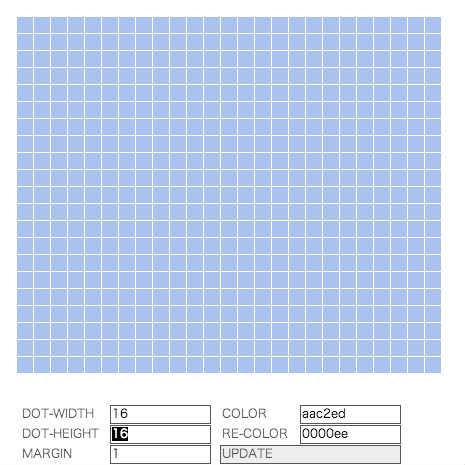
ドットのようなキャンバスでお絵描きができるFlashです。
ドットのサイズや色は下のエリアで変更できます。

UI回り改善したいです。
キャンバスを保存できるようにするとかも。。
♥2 |
Line 214 |
Modified 2013-09-04 05:46:38 |
MIT License
archived:2017-03-10 19:35:08
ActionScript3 source code
/**
 * Copyright naoyago ( http://wonderfl.net/user/naoyago )
 * MIT License ( http://www.opensource.org/licenses/mit-license.php )
 * Downloaded from: http://wonderfl.net/c/6xVr
 */

package {
    import flash.text.TextRun;
    import flash.display.Shape;
    import flash.text.engine.BreakOpportunity;
    import flash.display.Sprite;
    import flash.display.Graphics;
    import flash.geom.ColorTransform;
    import flash.events.Event;
    import flash.events.MouseEvent;
    import flash.events.TextEvent;
    import flash.events.KeyboardEvent;
    import flash.text.TextField;
    import flash.text.TextFieldType;
    import flash.text.TextFormat;
    import flash.text.TextFormatAlign;

    public class DotDraw extends Sprite {

        private var mouse_down:Boolean = false;
        private var dot_width:uint = 16;
        private var dot_height:uint = 16;
        private var margin:uint = 1;
        private var dots:Array = new Array();
        private var color:uint = 0xaac2ed;
        private var re_color:uint = 0x0000ee;
        private var info_height:uint = 60;

        public function DotDraw() {
            setMouseStatus();
            createDot();
            setInfo();
        }

        // マウスの押下状態を取得
        private function setMouseStatus():void {
            stage.addEventListener(MouseEvent.MOUSE_DOWN, function():void {
                mouse_down = true;
            });

            stage.addEventListener(MouseEvent.MOUSE_UP, function():void {
                mouse_down = false;
            });
        }

        // Create Dot
        private function createDot():void {
            var max_x:uint = int(stage.stageWidth / (dot_width + margin)) - 1;
            var max_y:uint = int((stage.stageHeight - info_height) / (dot_height + margin)) - 1;

            for (var i:uint = 1; i < max_x ; i++) {
                dots[i] = new Array();
                for (var j:uint = 1; j < max_y ; j++) {
                    dots[i][j] = new Sprite();
                    var graphic:Graphics = dots[i][j].graphics;
                    graphic.beginFill(color, 1.0);
                    graphic.drawRect(i * (dot_width + margin), j * (dot_height + margin), dot_width, dot_height);
                    stage.addChild(dots[i][j]);
                    dots[i][j].addEventListener(MouseEvent.MOUSE_OVER, pressDot);
                }
            }
        }

        // press UPDATE
        private function reload():void {
            removeDots();
            createDot();
        }

        // remove dots
        private function removeDots():void {
            for each(var dot_y:Array in dots) {
                for each(var dot:Sprite in dot_y) {
                    stage.removeChild(dot);
                }
            }

            // clear array
            dots.length = 0;
        }

        // draw
        private function pressDot(e:Event):void {
            if (mouse_down === true) {
                var sp:Sprite = Sprite(e.target);
                var ct:ColorTransform = new ColorTransform();
                ct.color = re_color;
                sp.transform.colorTransform = ct;
            }
        }

        // info area
        private var input_width:TextField = new TextField;
        private var input_height:TextField = new TextField;
        private var input_margin:TextField = new TextField;
        private var input_color:TextField = new TextField;
        private var input_re_color:TextField = new TextField;

        // need code cleaning
        private function setInfo():void {
            // text format
            // font変えたいな(チラッ
            var text_format:TextFormat = new TextFormat();
            text_format.font = "_ゴシック";
            text_format.align = TextFormatAlign.LEFT;

            var h:int = 20;

            // text
            var text_width:TextField = new TextField;
            text_width.defaultTextFormat = text_format;
            text_width.text = String('DOT-WIDTH');
            text_width.textColor = 0x555555;
            text_width.width = 100;
            text_width.x = 20;
            text_width.y = stage.stageHeight - info_height;
            stage.addChild(text_width);

            // text
            var text_height:TextField = new TextField;
            text_height.defaultTextFormat = text_format;
            text_height.text = String('DOT-HEIGHT');
            text_height.textColor = 0x555555;
            text_height.width = 100;
            text_height.x = 20;
            text_height.y = stage.stageHeight - info_height + h;
            stage.addChild(text_height);

            // text
            var text_margin:TextField = new TextField;
            text_margin.defaultTextFormat = text_format;
            text_margin.text = String('MARGIN');
            text_margin.textColor = 0x555555;
            text_margin.width = 100;
            text_margin.x = 20;
            text_margin.y = stage.stageHeight - info_height + h * 2;
            stage.addChild(text_margin);

            // text
            var text_color:TextField = new TextField;
            text_color.defaultTextFormat = text_format;
            text_color.text = String('COLOR');
            text_color.textColor = 0x555555;
            text_color.width = 100;
            text_color.x = 220;
            text_color.y = stage.stageHeight - info_height;
            stage.addChild(text_color);

            // text
            var text_re_color:TextField = new TextField;
            text_re_color.defaultTextFormat = text_format;
            text_re_color.text = String('RE-COLOR');
            text_re_color.textColor = 0x555555;
            text_re_color.width = 100;
            text_re_color.x = 220;
            text_re_color.y = stage.stageHeight - info_height + h;
            stage.addChild(text_re_color);

            // input
            input_width.defaultTextFormat = text_format;
            input_width.border = true;
            input_width.borderColor = 0x555555;
            input_width.text = String(dot_width);
            input_width.type = TextFieldType.INPUT;
            input_width.width = 100;
            input_width.height = 18;
            input_width.x = 110;
            input_width.y = stage.stageHeight - info_height;
            addChild(input_width);

            // input
            input_height.defaultTextFormat = text_format;
            input_height.border = true;
            input_height.borderColor = 0x555555;
            input_height.text = String(dot_height);
            input_height.type = TextFieldType.INPUT;
            input_height.width = 100;
            input_height.height = 18;
            input_height.x = 110;
            input_height.y = stage.stageHeight - info_height + h;
            addChild(input_height);

            // margin
            input_margin.defaultTextFormat = text_format;
            input_margin.borderColor = 0x555555;
            input_margin.border = true;
            input_margin.text = String(margin);
            input_margin.type = TextFieldType.INPUT;
            input_margin.width = 100;
            input_margin.height = 18;
            input_margin.x = 110;
            input_margin.y = stage.stageHeight - info_height + h * 2;
            addChild(input_margin);

            // input
            input_color.defaultTextFormat = text_format;
            input_color.border = true;
            input_color.borderColor = 0x555555;
            input_color.text = convertRgb(color);
            input_color.type = TextFieldType.INPUT;
            input_color.width = 100;
            input_color.height = 18;
            input_color.x = 300;
            input_color.y = stage.stageHeight - info_height;
            addChild(input_color);

            // input
            input_re_color.defaultTextFormat = text_format;
            input_re_color.border = true;
            input_re_color.borderColor = 0x555555;
            input_re_color.text = convertRgb(re_color);
            input_re_color.type = TextFieldType.INPUT;
            input_re_color.width = 100;
            input_re_color.height = 18;
            input_re_color.x = 300;
            input_re_color.y = stage.stageHeight - info_height + h;
            addChild(input_re_color);

            // button
            var button:TextField = new TextField;
            button.defaultTextFormat = text_format;
            button.text = String('UPDATE');
            button.textColor = 0x555555;
            button.border = true;
            button.borderColor = 0x555555;
            button.background = true;
            button.backgroundColor = 0xEEEEEE;
            button.width = 180;
            button.height = 18;
            button.x = 220;
            button.y = stage.stageHeight - info_height + h * 2;;
            stage.addChild(button);

            button.addEventListener(MouseEvent.CLICK, clickUpdate);
        }

        private function convertRgb(color:uint):String {
            var alpha:uint = (color >> 24) & 0xff;
            var red:uint = (color >> 16) & 0xff;
            var green:uint = (color >> 8) & 0xff;
            var blue:uint = color & 0xff;
            var red2:String = addZero(red.toString(16), 2);
            var green2:String = addZero(green.toString(16), 2);
            var blue2:String = addZero(blue.toString(16), 2);
            return String(red2 + green2 + blue2);
        }

        private function addZero(num:String, digit:Number):String {
            var str:String = num;
            while (str.length < digit) {
                str = "0" + str;
            }
            return str;
        }

        private function clickUpdate(e:Event):void {
            color = uint(parseInt("0x" + input_color.text));
            re_color = uint(parseInt("0x" + input_re_color.text));
            margin = parseInt(input_margin.text);
            dot_width = parseInt(input_width.text);
            dot_height = parseInt(input_height.text);
            reload();
        }
    }
}