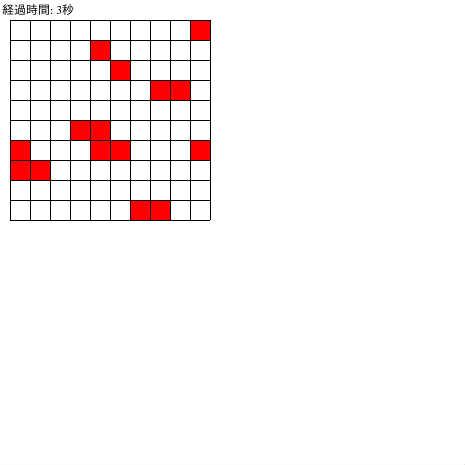
ライフゲーム
♥0 |
Line 102 |
Modified 2009-12-29 04:41:38 |
MIT License
archived:2017-03-10 03:30:38
ActionScript3 source code
/**
 * Copyright ser1zw ( http://wonderfl.net/user/ser1zw )
 * MIT License ( http://www.opensource.org/licenses/mit-license.php )
 * Downloaded from: http://wonderfl.net/c/5Ie8
 */

package {
  import flash.display.Sprite;
  import flash.display.Shape;
  import flash.utils.Timer;
  import flash.events.TimerEvent;
  import flash.text.TextField;

  public class LifeGame extends Sprite {
    private var table:Vector.<Vector.<Boolean>>; // セルの状態を保持するテーブル
    private var tmpTable:Vector.<Vector.<Boolean>>; // 更新用のテーブル
    private const TABLE_COLS:int = 10;
    private const TABLE_ROWS:int = 10;
    private var field:Shape; // セル表示フィールド
    private const CELL_WIDTH:int = 20;
    private const CELL_HEIGHT:int = 20;
    private var timer:Timer;
    private var tf:TextField; // 経過時間表示用

    public function LifeGame() {
      var i:int, j:int;
      table = new Vector.<Vector.<Boolean>>(TABLE_ROWS);
      for (j = 0; j < TABLE_ROWS; j++) {
      	table[j] = new Vector.<Boolean>(TABLE_COLS);
      	for (i = 0; i < TABLE_COLS; i++) {
      	  table[j][i] = Math.random() < 0.3; // 人口密度の初期値は0.3くらい
      	}
      }
      // 更新用のテーブルは末端を考えやすいように番兵用の領域も確保
      tmpTable = new Vector.<Vector.<Boolean>>(TABLE_ROWS + 2);
      for (j = 0; j < TABLE_ROWS + 2; j++) {
      	tmpTable[j] = new Vector.<Boolean>(TABLE_COLS + 2);
      }

      tf = new TextField();
      tf.width = 200;
      tf.height = 20;
      addChild(tf);

      field = new Shape();
      field.x = 10;
      field.y = tf.y + tf.height;
      drawField();
      addChild(field);

      timer = new Timer(1000);
      timer.addEventListener(TimerEvent.TIMER, onStep);
      timer.start();
    }

    private function onStep(e:TimerEvent):void {
      tf.text = "経過時間: " + timer.currentCount + "秒";
      updateTable();
      drawField();
    }

    private function updateTable():void {
      var i:int, j:int, di:int, dj:int, lives:int;
      // tableの内容をtmpTableにコピー(番兵つき)
      for (j = 0; j < TABLE_ROWS; j++) {
	      tmpTable[j + 1][0] = table[j][TABLE_COLS - 1];
	      tmpTable[j + 1][TABLE_COLS + 1] = table[j][0];
	      for (i = 0; i < TABLE_COLS; i++) {
	        tmpTable[j + 1][i + 1] = table[j][i]
	      }
      }
      for (i = 0; i < TABLE_COLS; i++) {
	      tmpTable[0][i + 1] = table[TABLE_ROWS - 1][i];
	      tmpTable[TABLE_ROWS + 1][i + 1] = table[0][i];
      }
      tmpTable[0][0] = table[TABLE_ROWS - 1][TABLE_COLS - 1];
      tmpTable[0][TABLE_COLS + 1] = table[0][TABLE_COLS - 1];
      tmpTable[TABLE_ROWS + 1][0] = table[TABLE_ROWS - 1][0];
      tmpTable[TABLE_ROWS + 1][TABLE_COLS + 1] = table[0][0];

      // コピーしたtmpTableを使ってtableを更新
      for (j = 0; j < TABLE_ROWS; j++) {
	      for (i = 0; i < TABLE_COLS; i++) {
	        lives = 0;
	        for (dj = -1; dj <= 1; dj++) {
	          for (di = -1; di <= 1; di++) {
	            if (tmpTable[j + 1 + dj][i + 1 + di]) {
		            lives++;
	            }
	          }
	        }
	        table[j][i] = ((!tmpTable[j + 1][i + 1] && lives == 3) || // (i, j)が死亡かつ周囲が3つ生きているか、
	          (tmpTable[j + 1][i + 1] && (lives == 2 || lives == 3))); // (i, j)が生存かつ周囲が2つか3つ生きて入れば生存
	      }
      }
    }

    private function drawField():void {
      var i:int, j:int, color:uint;
      field.graphics.clear();
      for (j = 0; j < TABLE_ROWS; j++) {
	      for (i = 0; i < TABLE_COLS; i++) {
	        color = table[j][i] ? 0xff0000 : 0xffffff;
	        field.graphics.beginFill(color);
	        field.graphics.drawRect(CELL_WIDTH * i, CELL_HEIGHT * j, CELL_WIDTH, CELL_HEIGHT);
	        field.graphics.endFill();
	      }
      }

      field.graphics.lineStyle(0.1, 0x000000);
      for (j = 0; j < TABLE_ROWS + 1; j++) {
	      field.graphics.moveTo(0, CELL_HEIGHT * j);
	      field.graphics.lineTo(CELL_WIDTH * TABLE_COLS, CELL_HEIGHT * j);
      }
      for (i = 0; i < TABLE_COLS + 1; i++) {
	      field.graphics.moveTo(CELL_WIDTH * i, 0);
	      field.graphics.lineTo(CELL_WIDTH * i, CELL_HEIGHT * TABLE_ROWS);
      }
    }
  }
}