/**
 * Copyright hi.kurosawa ( http://wonderfl.net/user/hi.kurosawa )
 * MIT License ( http://www.opensource.org/licenses/mit-license.php )
 * Downloaded from: http://wonderfl.net/c/2NZO
 */

package {
    //----------------------------------------------
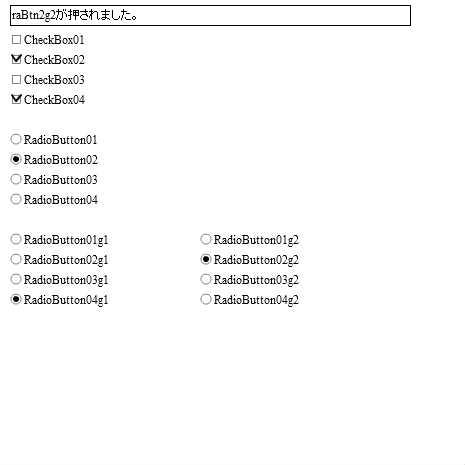
    //RadioButtonクラスTEST
    // http://programmingatelier.net/
    //----------------------------------------------
    import flash.display.Sprite;
    import flash.events.Event;
    import flash.display.StageScaleMode;
    import flash.display.StageAlign;
    import flash.text.TextFieldAutoSize;
    //import cls.*;

    public class  testCheckBox extends Sprite {
        private var cMess:clsText;
        private var raB1g1:clsRadioButton;
        private var raB2g1:clsRadioButton;
        private var raB3g1:clsRadioButton;
        private var raB4g1:clsRadioButton;
        private var raB1g2:clsRadioButton;
        private var raB2g2:clsRadioButton;
        private var raB3g2:clsRadioButton;
        private var raB4g2:clsRadioButton;

        public function testCheckBox() {
            if (stage) init();
            else addEventListener(Event.ADDED_TO_STAGE, init);
        }
        private function init(e:Event = null):void {
            removeEventListener(Event.ADDED_TO_STAGE, init);
            stage.scaleMode = StageScaleMode.NO_SCALE;
            stage.align = StageAlign.TOP_LEFT;
            cMess=new clsText("",10, 5, 400, 20,true)
            addChild(cMess);
            addChild(new clsCheckBox("chBox1", "CheckBox01" , 10, 30,false,onChkBox));
            addChild(new clsCheckBox("chBox2", "CheckBox02" , 10, 50,false,onChkBox));
            addChild(new clsCheckBox("chBox3", "CheckBox03" , 10, 70,false,onChkBox));
            addChild(new clsCheckBox("chBox4", "CheckBox04" , 10, 90,false,onChkBox));

            addChild(new clsRadioButton("raBtn1", "RadioButton01" , 10, 130,"",false,onRaBtn));
            addChild(new clsRadioButton("raBtn2", "RadioButton02" , 10, 150,"",false,onRaBtn));
            addChild(new clsRadioButton("raBtn3", "RadioButton03" , 10, 170,"",false,onRaBtn));
            addChild(new clsRadioButton("raBtn4", "RadioButton04" , 10, 190,"",false,onRaBtn));

            raB1g1 = new clsRadioButton("raBtn1g1", "RadioButton01g1" , 10, 230, "g1", false, onRaBtn);
            addChild(raB1g1);
            raB2g1 = new clsRadioButton("raBtn2g1", "RadioButton02g1" , 10, 250, "g1", false, onRaBtn);
            addChild(raB2g1);
            raB3g1 = new clsRadioButton("raBtn3g1", "RadioButton03g1" , 10, 270, "g1", false, onRaBtn);
            addChild(raB3g1);
            raB4g1 = new clsRadioButton("raBtn4g1", "RadioButton04g1" , 10, 290, "g1", false, onRaBtn);
            addChild(raB4g1);

            raB1g2 = new clsRadioButton("raBtn1g2", "RadioButton01g2" , 200, 230, "g2", false, onRaBtn);
            addChild(raB1g2);
            raB2g2 = new clsRadioButton("raBtn2g2", "RadioButton02g2" , 200, 250, "g2", false, onRaBtn);
            addChild(raB2g2);
            raB3g2 = new clsRadioButton("raBtn3g2", "RadioButton03g2" , 200, 270, "g2", false, onRaBtn);
            addChild(raB3g2);
            raB4g2 = new clsRadioButton("raBtn4g2", "RadioButton04g2" , 200, 290, "g2", false, onRaBtn);
            addChild(raB4g2);
        }
        private function onChkBox(chkBox:clsCheckBox):void {
            cMess.text = chkBox.name + "が押されました。[" + chkBox.value + "]になりました。";
        }
        private function onRaBtn(rgBtn:clsRadioButton):void {
            cMess.text = rgBtn.name + "が押されました。";
        }
    }
}
//--------------------------------------------------
//package cls {
    //----------------------------------------------
    //RadioButton
    // http://programmingatelier.net/
    //----------------------------------------------
    import flash.display.Sprite;
    import flash.events.Event;
    import flash.events.MouseEvent;
    import flash.text.TextField;
    import flash.ui.MouseCursor;
    import flash.ui.Mouse;

//    public class  clsRadioButton extends Sprite {
    class  clsRadioButton extends Sprite {
        private static var arrRadBtn:Array = new Array();
        private var spBack:Sprite
        private var spMain:Sprite;
        private var fncChkFnc:Function;
        private var strText:String;
        private var strGrp:String;
        private var bolVal:Boolean;
        private var tfText:TextField;

        //CheckBox
        // nam:ボタンの名称(ボタンを区別するために使用)
        // sText:表示する文字
        // nX,nY:表示位置
        // sGrp:グループ
        // val:チェック状態
        // fChk:クリックしたときの関数
        public function clsRadioButton(nam:String,sText:String ,
                nX:Number, nY:Number,sGrp:String="", val:Boolean = false ,
                fChk:Function=null) {

            this.name = nam;
            fncChkFnc = fChk;
            this.x = nX;
            this.y = nY;
            bolVal = val;
            strText = sText;
            strGrp = sGrp;
            clsRadioButton.arrRadBtn.push(this);
            if (stage) init();
            else addEventListener(Event.ADDED_TO_STAGE, init);
        }
        private function init(e:Event = null):void {
            removeEventListener(Event.ADDED_TO_STAGE, init);
            spBack=new Sprite();
            addChild(spBack);
            spMain=new Sprite();
            addChild(spMain);
            dspChk();
            tfText = new TextField();
            tfText.autoSize = "left";
            tfText.text = strText;
            tfText.selectable = false;
            tfText.x = 12;
            tfText.y = 0 ;
            spMain.addChild(tfText);
            var w:int = tfText.width+12;
            var h:int = tfText.height;


            spBack.graphics.beginFill(0x000000);
            spBack.graphics.lineStyle(1,0x000000);
            spBack.graphics.drawRect(0, 0,  w, h);
            spBack.alpha = 0;

            this.addEventListener(MouseEvent.CLICK, fncChk);
            //マウスがのった時の色の変更
            this.addEventListener(MouseEvent.ROLL_OVER, onOver);
            this.addEventListener(MouseEvent.ROLL_OUT, onOut);
        }
        private function dspChk():void {
            spMain.graphics.clear();
            spMain.graphics.beginFill(0xffffff);
            spMain.graphics.lineStyle(1, 0x000000, 0.5);
            spMain.graphics.drawCircle(6, 9,  5);
            spMain.graphics.endFill();
            if(bolVal==true) {
                spMain.graphics.beginFill(0x000000);
                spMain.graphics.lineStyle(2, 0x000000);
                spMain.graphics.drawCircle(6, 9,  2);
                spMain.graphics.endFill();
            }
        }
        //クリック
        private function fncChk(e:Event):void {
            if (this.bolVal == true) { return; }
            this.value = true;
            if(fncChkFnc!=null) {fncChkFnc(this);}
        }
        //マウスオーバー処理(ボタンらしく見せる)
        public function onOver(e:MouseEvent):void {
            spBack.alpha = 0.1;
        }
        public function onOut(e:MouseEvent):void {
            spBack.alpha = 0;
        }
        //CheckBoxの有効(bflg=true)・無効(bflg=false)
        public function enable(bflg:Boolean):void {
            this.mouseEnabled = bflg;
            if (bflg == true) { this.alpha = 1.0; }
            else {this.alpha = 0.5;}
        }
        public function get value():Boolean {
            return bolVal;
        }

        public function set value(value:Boolean):void {
            if (this.bolVal == value) { return;}
            if (this.bolVal == true) {
                this.bolVal = value;
                this.dspChk();
            } else {
                for (var i:int = 0; i < clsRadioButton.arrRadBtn.length; i++) {
                    var obj:clsRadioButton = clsRadioButton.arrRadBtn[i];
                    if (obj.grpName == this.grpName) {
                        if (obj.name != this.name) {
                            obj.value = false;
                            //obj.dspChk();
                        }
                    }
                }
                this.bolVal = true;
                this.dspChk();
            }
        }
        public function get grpName():String {
            return strGrp;
        }
    }
//}
//-------------------------------------------
//package cls {
    //----------------------------------------------
    //CheckBox
    // http://programmingatelier.net/
    //----------------------------------------------
    import flash.display.Sprite;
    import flash.events.Event;
    import flash.events.MouseEvent;
    import flash.text.TextField;
    import flash.ui.MouseCursor;
    import flash.ui.Mouse;

//    public class  clsCheckBox extends Sprite {
    class  clsCheckBox extends Sprite {
        private var spBack:Sprite
        private var spMain:Sprite;
        private var fncChkFnc:Function;
        private var strText:String;
        //private var intX0:int;
        //private var intY0:int;
        private var bolVal:Boolean;
        private var tfText:TextField;

        //CheckBox
        // nam:ボタンの名称(ボタンを区別するために使用)
        // sText:表示する文字
        // nX,nY:表示位置
        // val:チェック状態
        // fChk:クリックしたときの関数
        public function clsCheckBox(nam:String,sText:String ,
                nX:Number, nY:Number, val:Boolean=false , fChk:Function=null) {

            this.name = nam;
            fncChkFnc = fChk;
            this.x = nX;
            this.y = nY;
            bolVal = val;
            strText = sText;

            if (stage) init();
            else addEventListener(Event.ADDED_TO_STAGE, init);
        }
        private function init(e:Event = null):void {
            removeEventListener(Event.ADDED_TO_STAGE, init);
            spBack=new Sprite();
            addChild(spBack);
            spMain=new Sprite();
            addChild(spMain);
            dspChk();
            tfText = new TextField();
            tfText.autoSize = "left";
            tfText.text = strText;
            tfText.selectable = false;
            tfText.x = 12;
            tfText.y = 0 ;
            spMain.addChild(tfText);
            var w:int = tfText.width+12;
            var h:int = tfText.height;


            spBack.graphics.beginFill(0x000000);
            spBack.graphics.lineStyle(1,0x000000);
            spBack.graphics.drawRect(0, 0,  w, h);
            spBack.alpha = 0;

            this.addEventListener(MouseEvent.CLICK, fncChk);
            //マウスがのった時の色の変更
            this.addEventListener(MouseEvent.ROLL_OVER, onOver);
            this.addEventListener(MouseEvent.ROLL_OUT, onOut);
        }
        private function dspChk():void {
            spMain.graphics.clear();
            spMain.graphics.beginFill(0xffffff);
            spMain.graphics.lineStyle(1,0x00000,0.5);
            spMain.graphics.drawRect(2, 5,  8, 8);
            spMain.graphics.endFill();
            if(bolVal==true) {
                spMain.graphics.lineStyle(2, 0x00000);
                spMain.graphics.moveTo(2,5);
                spMain.graphics.lineTo(6,11);
                spMain.graphics.lineTo(11,5);
            }
        }
        //クリック
        public function fncChk(e:Event):void {
            bolVal = !bolVal;
            dspChk();
            if(fncChkFnc!=null) {fncChkFnc(this);}
        }
        //マウスオーバー処理(ボタンらしく見せる)
        public function onOver(e:MouseEvent):void {
            spBack.alpha = 0.1;
        }
        public function onOut(e:MouseEvent):void {
            spBack.alpha = 0;
        }
        //CheckBoxの有効(bflg=true)・無効(bflg=false)
        public function enable(bflg:Boolean):void {
            this.mouseEnabled = bflg;
            if (bflg == true) { this.alpha = 1.0; }
            else {this.alpha = 0.5;}
        }
        public function get value():Boolean {
            return bolVal;
        }

        public function set value(value:Boolean):void {
            bolVal = value;
            dspChk();
        }
    }
//}
//------------------------------------------
//package cls {
    //----------------------------------------------
    //テキストの表示クラス
    // http://programmingatelier.net/
    //----------------------------------------------
    import flash.text.TextField;

//    public class  clsText extends TextField {
    class  clsText extends TextField {
        //テキストの表示クラス
        // sText:表示する文字
        // nX,nY:表示位置
        // nWidth,nHeight:表示するサイズ
        // bBorder:外枠の有無
        public function clsText(sText:String ,
                nX:Number, nY:Number, nWidth:Number, nHeight:Number ,
                bBorder:Boolean=false,bSel:Boolean=true) {
            this.text = sText;
            this.x = nX;
            this.y = nY;
            this.width = nWidth;
            this.height = nHeight;
            this.border = bBorder;
            this.background = bBorder;
            this.selectable = bSel;
        }
    }
//}